How To: Block recent activities on Facebook

How To: Block recent activities on Facebook
This video is about how to block recent activities on Facebook. The first thing that you will have to do is to log in to your Facebook account. After logging in to your account, the next thing that you will have to do is to go to account settings and look for the "Ads and Pages". After you have found "Ads and Pages", click on the "Edit Settings" and go to the "Special Permissions" tab and uncheck "Publish recent activity" box then press "Okay" after wards. The next step is to look for "Events" and click "Edit Settings". Once you have clicked "Edit Settings", go to "Special Permissions" tab and uncheck "Publish to streams" box, then click "Okay". Then the next step is to look for "Groups". Do the same process as what you did in the "Events". The final step is to look for "Photos" and "Videos". Do the same process as what you did in the "Groups". Then you're done! Please enable JavaScript to watch this video.


Download Snapchat++ Free on iOS Using AppValley App: If you are bored of using the regular Snapchat application on your iPhone/iPad then it is time that you move over to Snapchat++. As you might already know that ++ applications are the enhanced versions of the regular one.
Snapchat Hack without Jailbreak - Works on iPhone - MGeeky


A convenient feature built into the BlackBerry KEYone keyboard is the ability to set custom key shortcuts from the home screen. You're able to assign two distinct shortcuts for every letter key — for long presses and short presses. Keyboard shortcuts can be used for so many functions: set a key to
How to Remove On-Screen Keyboard From Desktop | It Still Works


That's why we think Primo iPhone Data Recovery is a perfect option to fix iPhone contacts missing from iOS 11/11.1. Primo iPhone Data Recovery is capable of recovering disappeared iPhone contacts after iOS 11 update with or without backup. More importantly, it can extract your disappeared iPhone contacts on iOS 11 and recover them selectively.
How to Find & Fix Missing Contacts in iOS 7.1.2 « iOS


I just bought a Palm Treo 650 and am pretty happy with it, but I can't help wondering about what different ways I could connect to the Internet with it. I know I can pay through the nose for a data service from my cellular provider, but I'm wondering if there are any ways to connect via bluetooth or wifi.
How to disable the Internet connection on your Palm Centro


How To: Install a Custom ROM on Your HTC One for a Completely New Experience How To : Run Multiple ROMs at the Same Time on Your HTC One How To : Get the LG G3's Lock & Unlock Sounds on Your Nexus Device
Best Custom ROMs for Sprint HTC One (M7spr) | DroidViews


This app will not only serve as your root management app to grant or deny superuser privileges to other apps, but it will also provide an interface for installing Magisk modules and help you hide your root status from Google's SafetyNet. To install Magisk Manager, tap the link below from your OnePlus 6.
How to Root Your OnePlus 6T — A Beginner's Guide


I don't think there are applications that merge social streams. What you have is desktop apps that unify different communication apps into one single interface.


Camera . With no further ado - the cameras. Yes, this is the make-or-break reason to buy a Nokia 9 PureView. If you want the short verdict: no, the phone's unique five-lens setup does not
Nokia 9 PureView camera sample photos vs. Gcam vs. Pixel 3


Whether it's for your company, your professional image, or just your personal account, making a poll on Instagram is a great way to reach out to followers, friends, family, and other users to measure their thoughts and opinions about any given topic. Instagram for Android and iOS makes it fun and
Instagram Polls is embarrassing users who thought their votes

In this softModder
Android Gaming Gadget Hacks - YouTube


When Windows 10 was released, many people were up in arms over the operating system's ability to constantly track how users were interacting with it and would send that information back to Microsoft.
Windows 10 spying: How to opt out of Microsoft's intrusive

How to Use Adobe Digital Editions to add content to your Nook

How To: Reply to WhatsApp Group Chat Messages Privately

How To: Reply to WhatsApp Group Chat Messages Privately
Group chats in WhatsApp are great for communicating with multiple people at once, but that can be a blessing and a curse — any message you send will be seen by everyone, and that's not always ideal. Thankfully, there's a new feature that lets you respond to group messages privately.As of version 2.18.380, WhatsApp gives you the ability to privately reply to a group chat participant straight from the chat itself, doing away with the need to start a separate conversation from scratch. The feature is available for both iOS and Android devices, with minor variances in how it's implemented, but I'll outline any differences below.Don't Miss: 3 Ways to Read WhatsApp Messages Without Alerting the Sender

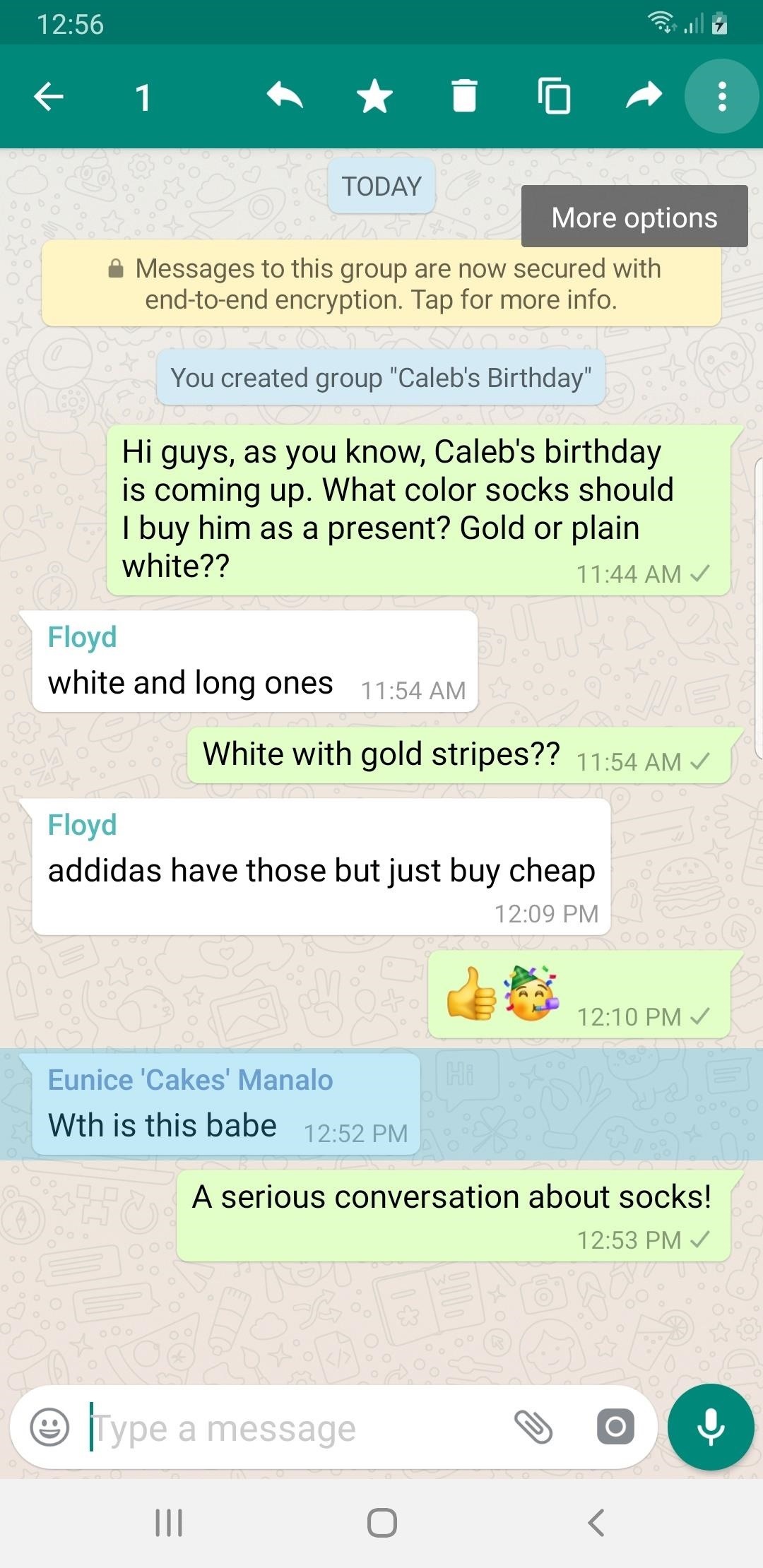
Posting a Private ReplyFirst, you'll need the latest version of WhatsApp, so install the update from the App Store (iPhone) or Google Play (Android).Now, when you want to reply to a message in a group chat, but you only want the sender to see your response, start by long-pressing their message. From there, either tap on "Reply privately" from the prompt (iOS) or tap the three-dot menu button, then select "Reply privately" (Android). Input your message as you normally would, then hit the send button. Regardless of whether you're on Android or iOS, any private discussion you have with a group chat participant will be located in a separate conversation page away from the group chat itself. The person you replied to can keep the conversation private by posting his or her replies within that chat page, which ensures private messages aren't accidentally posted in the group chat for everyone to see.Don't Miss: How to Add Descriptions & Grant Admin Privileges to Group Chats in WhatsAppFollow Gadget Hacks on Pinterest, Reddit, Twitter, YouTube, and Flipboard Sign up for Gadget Hacks' daily newsletter or weekly Android and iOS updates Follow WonderHowTo on Facebook, Twitter, Pinterest, and Flipboard
Cover image and screenshots by Amboy Manalo/Gadget Hacks


What to do when you have more content than room on your iOS device it will skip the unchecked songs, so the only way to listen to music that I don't want on my iPod is to check the boxes and
Game of Thrones soundtrack For The Throne lyrics and


Here's how to download FREE Ringtones on your Android Smartphone! Here's how to download FREE Ringtones on your Android Smartphone! How to download free ringtones and more ANDROID ONLY
How To Get Ringtones On Your Android Phone - ShoeMoney


We supply Samsung unlock codes for 3,354 Samsung cell phone models. Since launching this phone unlocking service, over 620,311 customers have already received Samsung unlock codes. It doesn't matter if it's an old Samsung, or one of the latest releases, with UnlockBase you will find a solution to successfully unlock your Samsung, fast.
Samsung Unlocking Instructions - UnlockRiver


With these apps, you can effortlessly customize your Android device. These apps play the important role in our daily life for example - Whatsapp, Facebook, and twitter etc and have become part of a day to day life. In the Google Play Store, there are free apps and some paid apps too. Also Read: Top 10 Best Apps To Surf Anonymously In Android
10 Must-Have Android Apps for 2019 | PCMag.com


With the 'Ok Google' voice commands, you can "cast spells" to turn the flashlight on and off. Just say the magic words - Lumos and Nox. Try 'Silenco' for the Silencing Charm to mute the ringer and notification on your phone/wand. To see what else you can do with Google and the Fantastic Beasts, check out here.
Google Assistant Doesn't Work with Your Account? Here's What


There are some free online GIF makers out there. They're not great, but if you you're looking for something super quick and with no bells or whistles, they'll get the job done. Giphy: This is the best place to find GIFs, and it has an easy GIF maker tool. GifMaker: You can drop a YouTube link into here to make from a video.
17 of the Best Free Online GIF Creators (Great Way to Make a


Chances are you'll enroll in fingerprint unlocking when setting up your shiny new Galaxy S10 for the first time. But it's always helpful to have a few more prints saved, so you can get into
What happened to the Samsung Galaxy S5 menu button
androidfact.com/what-happened-to-the-samsung-galaxy-s5-menu-button/
For some reason Samsung decided that a task manager button was more useful than a menu button. Happily though the menu button is still there, you just have to know where to look. The other day I stumbled across a reddit post where a user could not find the menu button on his S5. What made matters worse was the fact that the user was using an
Galaxy S6: How to Disable the Capacitive Buttons | Android


Social networking analyst Laurel Papworth says there are hidden messages behind the overt displays of self-promotion on websites like Facebook or MySpace. Status updates can show if someone is an


How to Fix A Broken iPhone Screen. There are three cheaper ways you can fix a cracked iPhone home screen, though. Not all are cheaper by the money but sometimes by the time you'd have to spend fretting about the shattered glass. Here are your options #1. Get it fixed by a third-party mechanic. #2.
5 Tips to fix an unresponsive iPhone screen - YouTube


Security researchers have found that 95% of Android devices running version 2.2 to 5.1 of operating system, which includes Lollipop and KitKat, are vulnerable to a security bug, affecting more than 950 Million Android smartphones and tablets.
15 Best Free Hacking Apps For Android [2019 Edition APKs]


Fortunately, there's a simple, non-root method on Android devices that will allow you to save both pictures and videos shared through Snapchat without notifying the sender. That way you can creep like a pro, and they can go on using Snapchat without worry.
How To: Save Snapchats Without Getting Caught on Your iPhone


When you hear the music or the voice from a YouTube video, you may want to extract the audio. Here you will learn how to do it easily. You can extract the audio online or with a video converter ().
Best 2 Methods to Extract Audio from YouTube Video

How To: Use Google Translate as a Proxy

How To: Use Google Translate as a Proxy
Need to break out of the restrictions your school or workplace have on internet browsing? Maybe you want to waste some time on YouTube, check out some gaming action on Twitch, or simply just browse Facebook or Twitter.Don't Miss: 10 Easy Speed Hacks for Google ChromeDistractions be damned, no one should have the power to take the internet away from you. And thanks to Google Translate, they can't! Here are two easy ways to use Google Translate as a proxy to get around URL restrictions and blocked sites.
How It WorksBy rerouting the URL through Google instead of your local area network, you can bypass websites that are blocked within your local network. This trick however can not bypass websites blocked on the ISP level, which would be an extremely rare occurrence.There are two ways to use Google Translate as a proxy, so let's get to it.

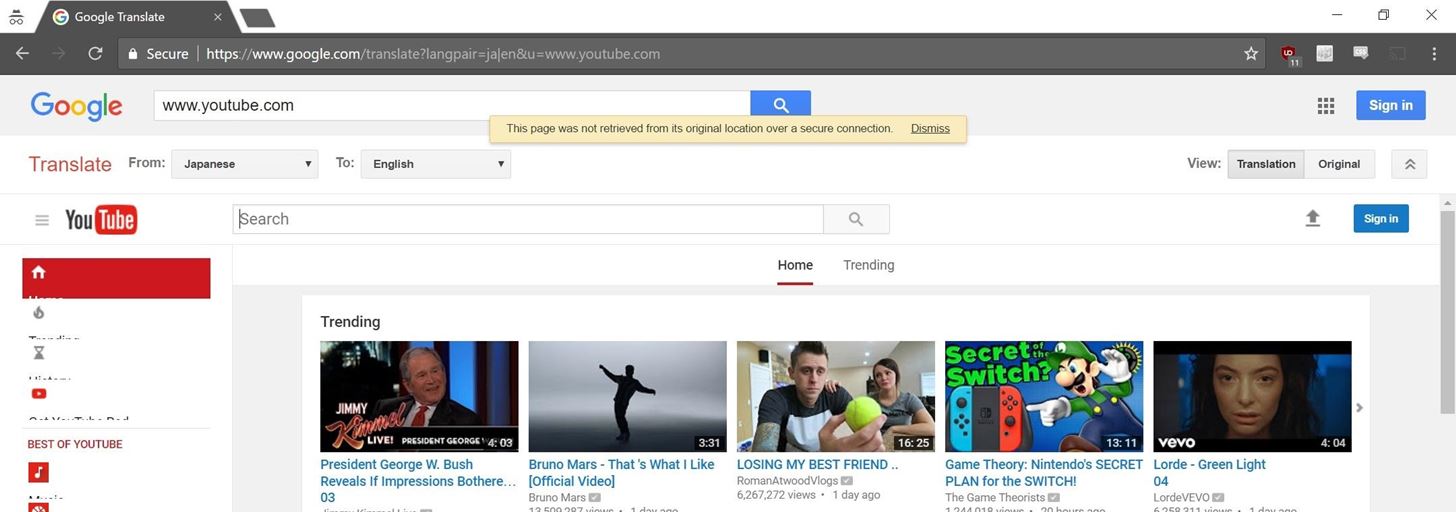
Method 1: Keep This URL HandyThe first way is the easiest—just keep the following URL handy:http://www.google.com/translate?langpair=ja|en&u=www.sitename.comWhen you want to access a blocked site, just change "www.sitename.com" to the URL you want to access. For example:http://www.google.com/translate?langpair=ja|en&u=www.youtube.comThis method turns the URL to Japanese and back to English. Easy peasy!

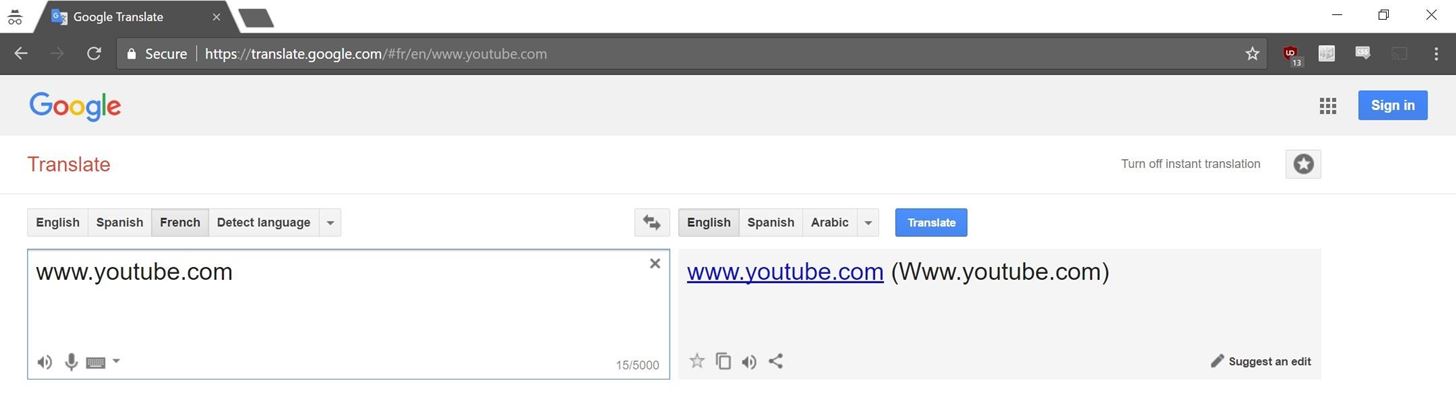
Method 2: Use Google TranslateIf you don't have the URL from the first method handy, no worries, just head over to Google Translate. From here, start with a language other than English, then enter the URL, and make sure the translated to language is set to English. You'll see that the URL is a clickable link, so you know what to do—click it! This method works the same way, it just takes a few clicks longer to get there. Enjoy, and browse safe!
Cover image and screenshots via WonderHowTo


Super quick and easy tutorial on how to install and play The Sims MOBILE on your PC/Android! ↓ Click for full description ↓ Step 1: Download Bluestacks (Ap
How to Fix Sims Mobile Not Loading (Android & iOS)


Here's how to see every photo you've liked on Instagram. Under "Account," tap the words "Posts I've Liked." All the pictures you've ever liked will be sorted chronologically for easy access.
Where can I see recent photos and videos I've liked? - Instagram.


Sony had just announced that Xperia Z3 owners will be able to install and run the N preview build. This is the first time a major manufacturer has offered Android previews on their phones. The preview build is only available for Xperia Z3's international models (D6603 and D6653), so those of you with T-Mobile's US var
Sony Xperia XZ1 Boasts 3D Scanning Capabilities « Next Reality

Carrier Cell Phones | Amazon.com


How To: Get Unique Face Filters by Following AR Creators on Instagram By Jake Peterson; Smartphones; Instagram 101; Social Media; It's easy to forget just how cool face filters are. Augmented reality has come a long way, and apps like Instagram now offer a suite of awesome effects to play with, but some of the best ones aren't easily found.
Instagram will allow third parties to create custom AR filters


Similarly, Amit Sood—the Google project leader—said that "nothing beats the first-person experience". Has future development potential. Some scholars and art critics believe the Google Arts & Culture will change how museums use the web.


From there, all selected photos and video will transfer. This works better for small batches of images, rather than your entire photo library; if you want to transfer your entire Mac library, you may be better off using iTunes or iCloud Photo Library. How to use Dropbox to transfer photos from your Mac to your iPhone or iPad
I can't upload photos. | Facebook Help Center | Facebook


So long, Siri: Google Assistant for iPhone is available for download but it released what many people believe to be a vastly superior product. The brand new Google Assistant app for iOS is
Google Assistant 101: How to Add Your Smart Home Devices to

and download xampp 7 or latest.
How do I setup XAMPP server with my registered domain


While there isn't as much personal data residing on your Apple Watch as there is on your iPhone, it's still a good idea to set a passcode for it and lock it up when you're not using it. If you don't, while it's charging or otherwise off your wrist, others may be able to sneak a peek at your activity
Forgot Your Apple Watch Passcode? Here's How to Bypass It

How to Safely Manage All Your Two-Factor Authentications in

How To: Hack and Pwn your iPhone or iPod Touch

How To: Hack and Pwn your iPhone or iPod Touch
Ok first thing first, you need to download the HackPack. In there is necessary things I use in the video. If you are on XP you must install .net frame work. ( the dotnxfx file) vista users don't have too. Link include:http://www.mediafire.com/?mddzxxf12nl http://www.sendspace.com/file/l73mjx http://www.megaupload.com/?d=ORDXQTD7 Hackpack includes boot loader files, .net fram work and finally DFU.ZIP This Video explains how to unlock or pwn your iPhone 2G (original one). You can use this phone with any carrier once unlocked. It must be GSM. You don't loose the App store or iTunes music store. You are going to also need winpwn, which can be found at winpwn.com Second, You are going to need an IPSW file. iPod touch Users.. download this one. http://freakshare.net/files/30208/iPo... (this includes appstore and itunes store) Mirror: http://uploaded.to/file/ih0z65/iPod1 ,1_2.0_5A347_Restore.ipsw Iphone users:http://tinyurl.com/5en7u3 When going into DFU you cannot use the command DFU in the video if you are an iPod Touch user. If you get Error 6, try another DFU method. For iPod Touch users use this to go into DFU. iPhone Users can use this as well. http://tinyurl.com/pwnageiphone Do not use ZiCrap or ZiPhone. Please enable JavaScript to watch this video.


The charter applications will be the first considered by the new school board, after the city took back control of its schools from the state this summer.
apps - Android - Reddit


Step 3: Use the Mod to "Select All" The module will not show as an app in your app drawer, as it just adds the feature directly into the official Snapchat app on your device. When you're ready to share a Snap, just tick the new empty box up at the top of the share screen next to the search icon to select all of your contacts in one tap.


If you live in a warm climate, it's often neither cost nor energy efficient to have central heating in your home. You may just need a small amount of heat to warm you on those chilly winter nights. With just a few items you can build your own electric heater. Read the steps listed below and learn
The Best Personal Portable Ceramic Heater - YouTube


Android used to have a notification ticker, but those days are long gone. Now, important new messages pop up on the top half of your screen with what's known as a "heads up notification." If you're in the middle of something, these popup notifications can be pretty annoying — luckily, it's pretty
Disable Heads-Up Notifications Without Root - Android


Don't Miss: Gamify Diagnostics on Your Android Phone with This Cool Little App. Accessing the Secret Diagnostic Menu. Before we begin, it's important to note that this feature may not be available on your device.
How to Unlock the Hidden Menu & Run a Diagnostic Test on Your


In this video, you shall get to know, how to customize some of your phone's UI elements, display battery percentage on battery icon in status bar, change order of tiles, add or delete tiles in
How to Hide the VPN 'Key' Icon on Android — No Root Needed


May 29, 2019 · Here's an inside look at Disney's new Star Wars theme park — Galaxy's Edge The Bottom Line If you are one of the lucky few headed to Batuu this month, you're going to need a plan to make the
How to Use the SOS Feature on Your Samsung Galaxy Phone in


Easter Eggs in software can sometimes be fun. Take for example Google Assistant in which thanks to the folks at ArsTechnica, they have stumbled across a trivia show-like Easter Egg that users can play and participate in with Google Assistant when you launch it and say, "I'm Feeling Lucky".
Google Assistant on the Pixel has a crazy 'I'm feeling lucky


Given how long image stacking has been around, and how many camera and phone makers have employed some version of it, it's fair to ask why Google's Night Sight seems to be so much better than
How Google's Night Sight Works, and Why It's So Good


News: Google Finally Releases ARCore 1.0 for Android Users, Adds Google Lens to Photos App By Tommy Google Docs Meets Instagram in Google's Next Social App
Google (@google) • Instagram photos and videos


News: Great Books for The Balloon Artist and Entertainer News: Balloon Library Site for Learning Balloon Animals News: Who Needs Clowns? 3D Printer Lets You Print Inflatable Rubber Balloon Animals How To: Fold a Chopsticks Rest from Its Paper Wrapper
Giant Balloon Birthday Cake Delivery - WonderHowTo


Now, let's proceed with the tutorial below to unlock Razer Phone 2 bootloader. How to Unlock Bootloader on Razer Phone 2. We have put together a detailed step-by-step instructions guide on how to unlock bootloader on Razer Phone 2. If you are used to unlocking bootloaders on any previous Nexus devices, then this should not be any different
How to Unlock Bootloader of Android Device With KingoRoot

How To: Lock Your Files & Create Password-Protected Folders in Windows 7/8

How To: Lock Your Files & Create Password-Protected Folders in Windows 7/8
Technology has progressed by leaps and bounds and has blessed people in a number of ways, but at the same time, it has troubled them also. Computers are now used in every aspect of life. No matter if you are a businessman, an employee, a student, or even a housewife, a computer can assist you in your routine work. You save your personal information, documents, and other similar sensitive stuff on your computer that can hurt you if they get compromised.Stolen data can easily be converted into the cash, which tempts many burglars to steal your information. These data thieves can do it by getting their hands on your computer physically or they can achieve their goal remotely through hacking.

How to Keep Your Files & Folders SecureKeeping this vulnerable situation of data security in view, NewSoftwares has worked day in and day out to engineer Folder Lock, which can keep you safe from all such threats. The software locks your personal files, password protects folders, encrypts your data, backs up your lockers, protects portable drives, shreds files, and offers other security features as well.
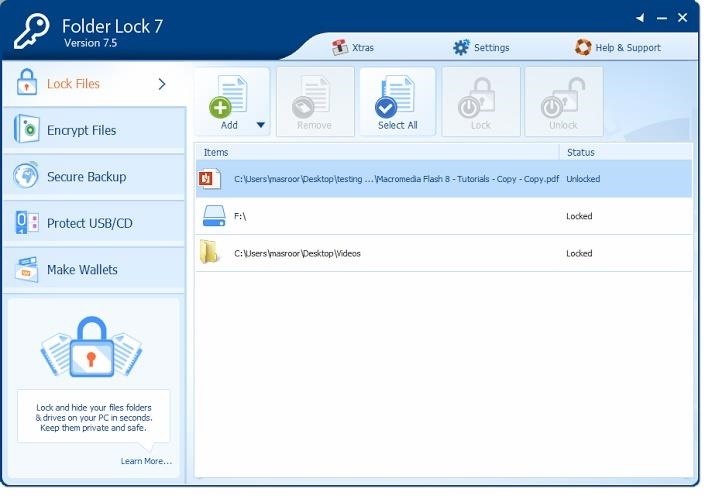
Lock Files & FoldersThe first time you open Folder Lock, you will have to enter the Master Password, which will be the key to all your data. Afterwards, you will be shown the locked files, which will be empty at the start. You just need to drag the desired files, folders, or drives and drop them in the software's interface to lock them, or by simply clicking on "Add" and selecting them.
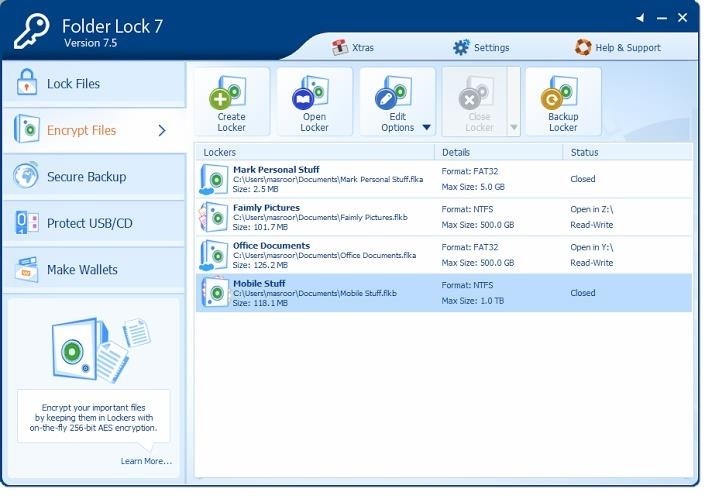
Encrypt Your DataIn order to encrypt your data, you will need to make a locker. To make a locker, go to the "Encrypt Files" feature and click on the "Create Locker" button in the top menu. Folder Lock adds 256-AES military-grade encryption to your data without any complexity. The lockers you create with this software are dynamic, which means they can adjust their size with respect to the size of files and folders stored in them. Moreover, these lockers can automatically be backed up with the "Secure Backup" feature that beefs up your security.Afterwards, you have to set up the password for the locker. At the end, you will select the type of locker; it can be either basic locker or backup-able locker that can be backed up automatically by the secure backup. Now, you can easily drag your intended files and folders into the software to encrypt them.
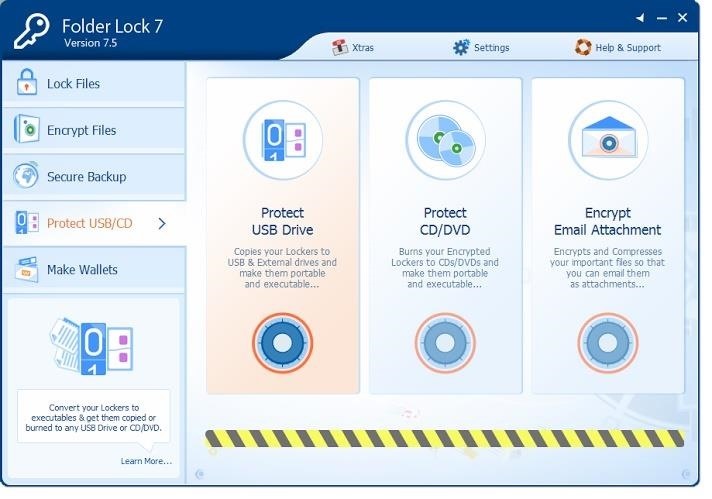
Protect Portable DrivesWith this comprehensive data security software, you can create portable lockers that can be executed on any portable drive, i.e., USB flash drive, external hard drives, and others.If you want to create a new portable locker, click on the "Protect USB Drive" option, which will open you a new window. Then click on "Create a New Portable Locker in USB/External Drive" to create a new portable locker directly on your USB or external portable drive. Now, you have to enter the details for the locker, such as its name, its destination (USB drive, network drive, or the hard drive), etc. After that, you have to enter your password for your portable locker—it should be a complex one, yet easy to remember. At this stage, you have to specify the size of your portable locker that can be between 300 MB to 2 TB. Now, you can protect your USB and other drives with this portable encrypted locker.
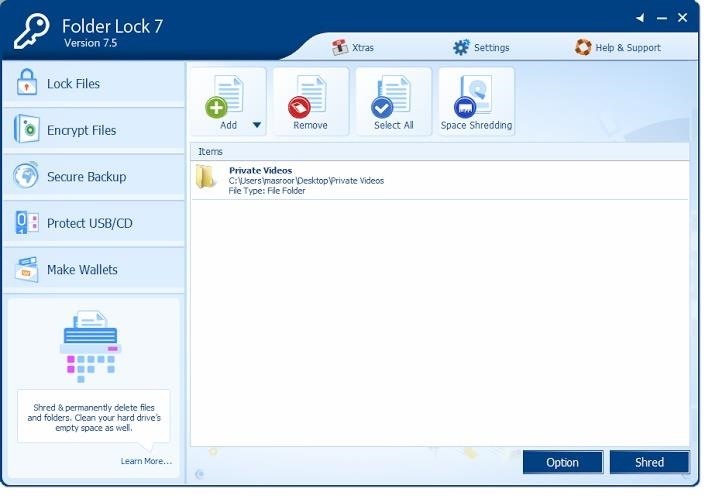
Shred Files (Deletes Files, Folders, & Drives Permanently)Users think that once they delete a file, it cannot be recovered, however, it is nothing more than their lack of knowledge, or you can say their innocence. Deleted files can easily be recovered, even if you format a disk ten times, data that was saved in it can be recovered. Thus, you need to shred files, and Folder Lock allows you to do it with extreme feasibility.To shred files with Folder Lock, click on "Extra" at the top bar and select "Shred Files." Now, select "Add File(s)," "Add Folder(s)," or "Add Drive(s)" as per your need. After that, you can add the desired files in the list that you want to shred. Clicking on "Shred" will permanently erase all those selected files/folders/drives and will make them impossible to recover, so make sure you have chosen the correct data for shredding. However, you can stop or pause the process if need be.
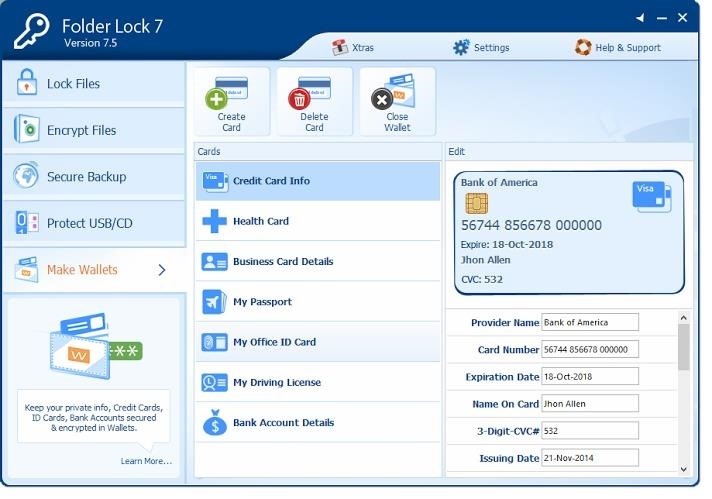
Make Secure WalletsWith this feature, you can make an encrypted wallet on your PC in which you can keep information about credit cards, bank accounts, ID cards, business cards, and similar other credentials.To make a wallet, go to "Make Wallets" and click on "Create wallet," which will open a new window where you have to choose the wallet name and destination by clicking on "Browse." After that, you need to enter a password for the new wallet; you must keep it complex and easy to remember as well. Now, open the created wallet and click on "Create Card," name the card, and select the type. Now, enter the details and click on "Close Wallet." Your wallet is now created and the information has been saved in it.
SummaryWhere the situation of data security is absolutely vulnerable, Folder Lock is truly a blessing for computer users that want to stay safe from hackers and other similar threats.
Kindly provide us your feedback about Folder Lock in the comments section below.


With root access, you're granted greater control over your device, allowing you to do things that your Android system wouldn't allow otherwise. Things like installing Xposed mods are made possible with root, but other advantages address performance and security, like stopping your Android logging, which is exactly what we'll be going over today.
How to Block Internet Access in Specific Apps on Android


This video shows how to use Google toolbar to share links with friends. Once you were in your desired website, click "Share" button located at the middle part of the Google toolbar.
How to share a Link to your Photo Album with Friends & Family

CES 2015: Wocket Digitizes All the Cards in Your Wallet into


Removing unwanted background noise is a challenge that's all too familiar to our fellow filmmakers. And although you might never have the perfect amount of silence during filming, there are a few steps you can take to minimize unwanted sounds when it comes to the post-production process.
Stopping Unsolicited Mail, Phone Calls, and Email | Consumer


How To: Automatically Save Snapchats onto Your Samsung Galaxy Note 2 Editor's Choice: 11 Camera Apps to Put Your Samsung Galaxy Note 2 on Steroids How To: Trick Apps That Won't Run if Your Phone Is Rooted into Thinking Its Not on the Galaxy Note 3
How to Save Any Photo or Video from Instagram on Your Galaxy


Want to watch this again later? Sign in to add this video to a playlist. Sign in. How to Glitch into the Big Brother House (easiest method) Never Patched - Duration: 5:36.
Big Brother Is Watching You Online: How To Avoid Being Tracked


How to Record Vine Videos Without Touching the Screen. Just like with Instagram, head over to the capture screen for Vine. Once you're there, tap on the red record button on the side panel and record any video by tapping anywhere on the viewfinder, until the green bar at the top reaches the end (for a full video).
Z Camera - Photo Editor, Beauty Selfie, Collage - Apps on


We are back with a fresh tutorial for your Samsung Galaxy S6 Edge smartphone. There is a new Volume mode that we want you to know about as long as it can significantly increase the volume levels of your handset's speaker, headphone and Bluetooth. There is no mystery that the manufacturers usually
Boost Headphone Volume on Your Samsung Galaxy S6 Edge [How-To


News: The Latest Razer Phone 2 Leaks Suggest Project Linda Might Actually Happen News: Razer's New Gaming Phone Leaked in Promo Video Ahead of Announcement Razer Phone vs. Galaxy Note 8: Comparing the Android Phones with the Best Specs
Linda Stone - May I Have Your Attention Please? - InterNoobs


Backup your iPod. Use iTunes to create a backup of your iPod before starting. This will let you easily restore to your previous settings if something goes wrong during the jailbreaking process. Select your iPod in iTunes, select "This computer", and then click the Back Up Now button. This will create a backup of your device on your computer.
How to Jailbreak an IPod Touch 4th Generation: 5 Steps


How to Create Custom App Shortcuts on Your Android Device. If the issue is with your Computer or a Laptop you should try using Reimage Plus which can scan the repositories and replace corrupt and missing files. This works in most cases, where the issue is originated due to a system corruption.
How to Create Custom App Shortcuts in Android | Beebom


Powered by the Tampa Bay Times, tampabay.com is your home for breaking news you can trust. Set us as your home page and never miss the news that matters to you. Sources: ComScore, Nielsen
Why Police Touch Your Taillight, It's Extremely Important

How to Let others download photos from your MobileMe Gallery
How To: Get the New 'Smart Remote' App from the Samsung Galaxy S6 on Any Galaxy Device

How To: Get the New 'Smart Remote' App from the Samsung Galaxy S6 on Any Galaxy Device
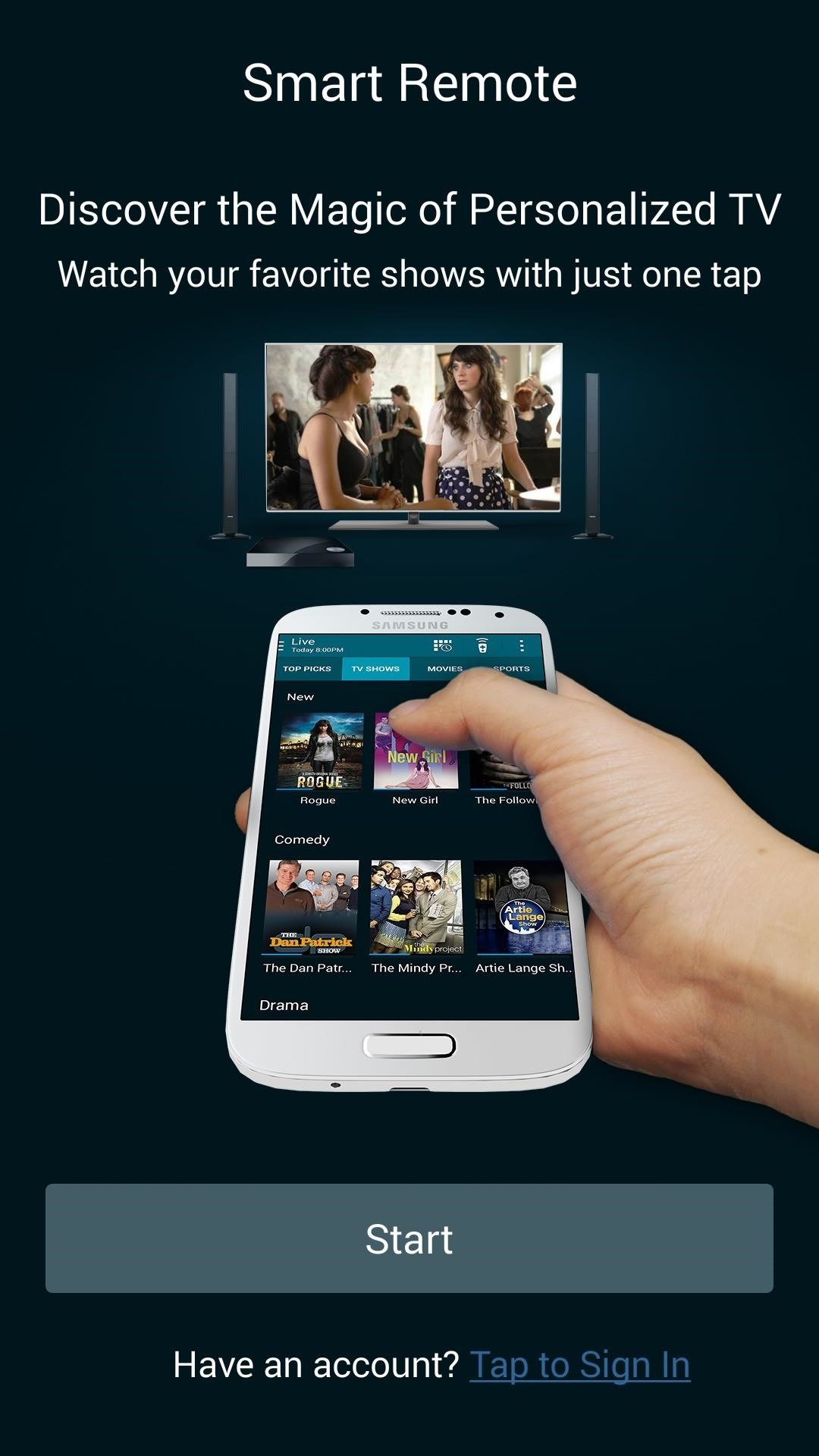
The Galaxy S6 won't hit shelves until later this spring, but that didn't stop the Android community from working its magic and pulling a handful of apps from the device's stock firmware. Several of these apps rely on framework elements that aren't present on current-generation Samsung Galaxy devices, but the new version of the Smart Remote app can be installed without much difficulty.As long as your Galaxy device sports an IR blaster, you should be able to use this newer version. No root or special permissions are required, but make sure you have "Unknown sources" enabled in Settings under "Security" before you begin. Please enable JavaScript to watch this video.

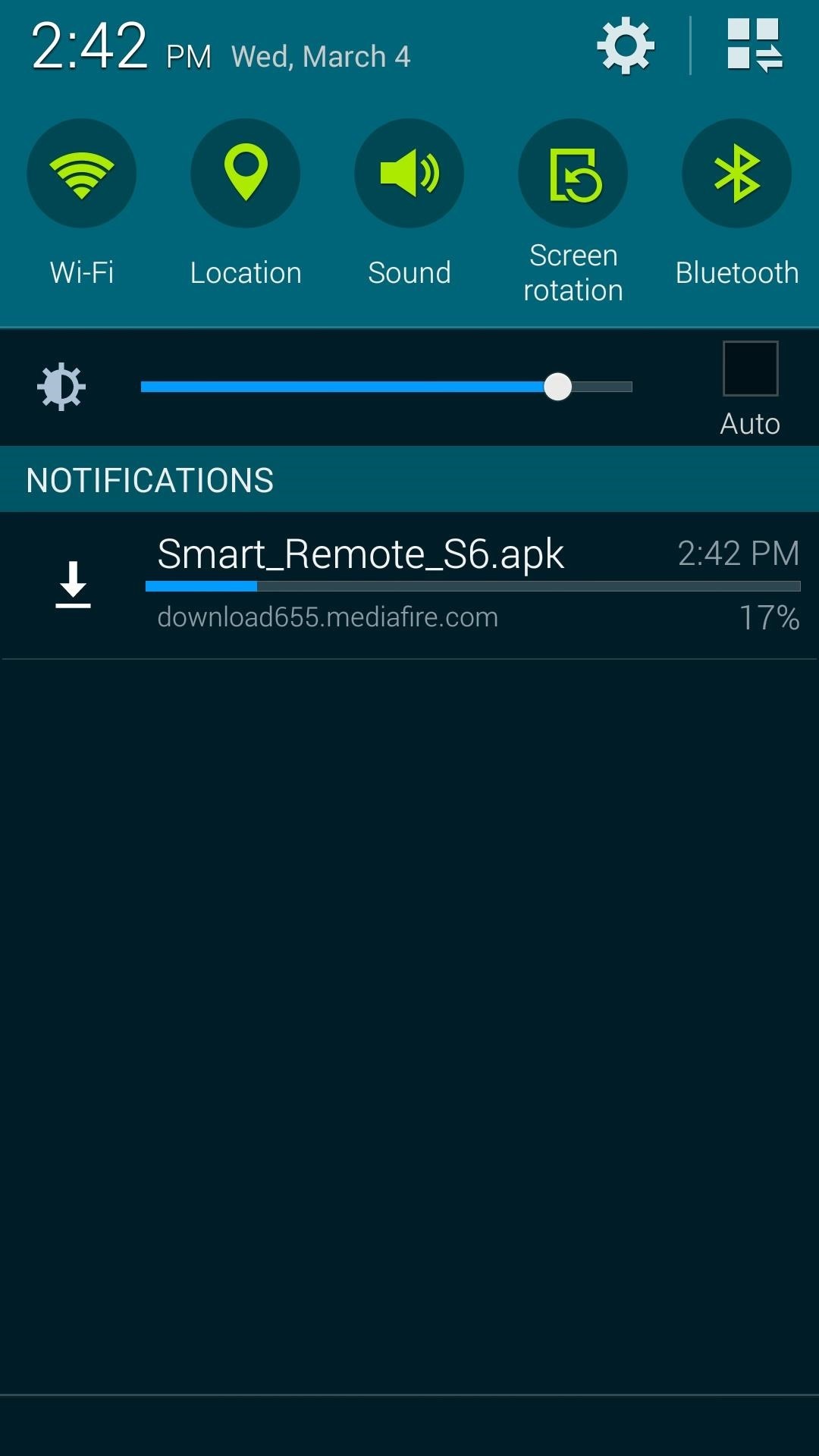
Step 1: Download the New VersionTo begin, point your Galaxy's web browser to this link, and the installer file will begin downloading immediately. Wait until it has finished before moving on to the next step.

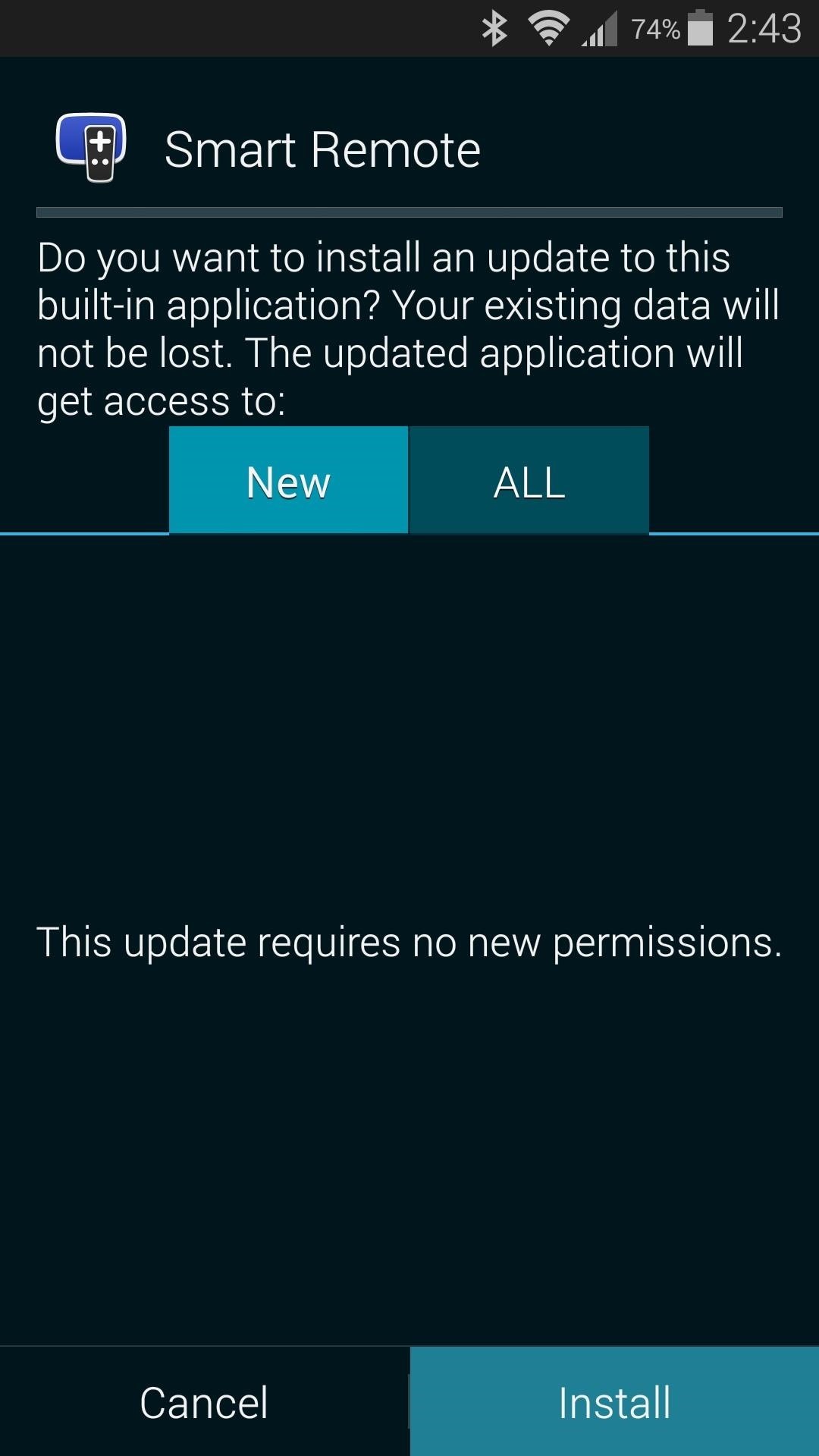
Step 2: Install the Updated Smart Remote AppWhen the download has finished, tap the corresponding "Download Complete" notification. This will launch Android's native installer interface, so tap "Install" on this screen, followed by "Open."

Step 3: Set Up Your TV & Other DevicesIf you've previously configured the Smart Remote app on your device, no further setup will be needed, as the existing app data is carried over. But if this is your first time using Smart Remote, a little setup is required.Begin by tapping the "Start" button, then enter your ZIP code on the following screen and press "Done" on your keyboard. Next, select your television provider from the following list, then tap "OK" to set up the remote features. From here, select your TV manufacturer from the list, then power your television off. Point the top of your phone towards your TV, then press the power button on the screen. If your TV comes back on at this point, the correct set of remote codes are being used, so tap "Yes" on the message at the bottom of the screen. Otherwise, tap "No," then try the next set of codes and so on. After that, you'll be given a chance to set up other devices like a cable or satellite box, and this process uses the same interface. With your devices set up, you'll be taken to Smart Remote's main menu. This shows you all of the programs that are airing now or coming up soon, and all you have to do to watch one is tap it. For a more traditional remote interface, though, tap the "Remote" button at the top of the screen. From here, you can use basic commands such as volume and channel tuners, but for more advanced options, swipe in from the tab on the right of the screen. For quick remote access, check your notification panel and you'll find a widget with basic controls. These same controls can also be found on the lock screen if you're running KitKat. Overall, the app has the same underlying functions, but a few usability tweaks have been made. What's your favorite change in this new update? Let us know in the comment section below, or drop us a line on Facebook, Google+, or Twitter.

How to Protect a touchscreen device against rain (cheaply


How to install Android 4.3 Jelly Bean test firmware on Samsung Galaxy S III GT-I9300: Open Odin. Put your phone in download mode, to do so power off your phone, and then turn it by pressing and holding Volume Down + Home Button + Power key simultaneously, keep the keys pressed until your phone shows you a warning, press Volume Up to continue.
How to Flash a Custom ROM onto Your Samsung Galaxy Note 2 and


Apple's latest iOS 10 for mobile devices is the company's biggest release ever for users, offering new features like image recognition in Photos, a revamped Music app and a brand-new home
WWDC 2019: 6 Coolest New iPhone Features in iOS 13 | Time


On your iPhone, go to the Settings app. Tap your name at the top of the screen (in iOS 9 and earlier, skip this step). Tap iCloud. Move the Notes slider to on/green. Repeat this process on every device you want to sync notes via iCloud.
Apple's iPhone 5 User Guide Tells You Everything You Need To


How to Use Netbus to Hack Remote Computer NetBus is a Software which is used to Control any computer in the internet. All you need is to install the patch on the remote system and find the ip address of the remote computer.
NetBus.Hack Removal Tool. Remove NetBus.Hack Now


Short Message Service is the technical term behind what's more commonly known as text messaging: sending a short message from one cell phone to another. However, it's also possible to send an SMS
How to Send SMS/Text Messages from Gmail Account


Google is Adding AAC Bluetooth Audio Codec for All Devices in AOSP. Android has been criticized in the past for the way Bluetooth as a whole performs on Google's mobile platform.
How to Boost Your HTC One's Audio Quality with - Gadget Hacks


Slack Themes # general Phone Box Photon PHP Pinnaca Copy and paste these values to your Slack settings Sidebar Theme section:
Safari 101: How to Request Desktop Sites on Your iPhone


Taking one-handed pictures with your phone can quickly devolve into a juggling act. You have to secure the phone in landscape mode (if you're doing it right), tap to focus, and then somehow hit the shutter button without shaking the device too much.
How to master the camera on the Samsung Galaxy S7


How to Fix A Broken iPhone Screen. There are three cheaper ways you can fix a cracked iPhone home screen, though. Not all are cheaper by the money but sometimes by the time you'd have to spend fretting about the shattered glass. Here are your options #1. Get it fixed by a third-party mechanic. #2.
5 Tips to fix an unresponsive iPhone screen - YouTube


How To: Use Scare Tactics to Increase Your Productivity & Accomplish More How To: Increase your work productivity How To: Group and Organize Your Start Screen Tiles in Windows 8 How To: Weightlifting Can Improve Your Memory, but Lazy People Can Do These 5 Things Instead
PDF Tips, Tricks, F˜ameworks & Apps For Building A Better Daily


Gmail app for android is easy to use and one of simple application, now gmail app has some new features like Pinch to Zoom, Swipe to Delete, and more. One of the features we like most on the new app is Swipe To Delete email in Gmail.
How to delete, not archive, Gmail messages on iPhone


Choosing a streaming stick -- Chromecast, Roku, or Fire TV? Roku Streaming Stick is free—or you can get Roku 3 for If you sign up for three months of Sling TV, Amazon's stick is free
How to Get Local Channels on Fire TV - Cordcutting.com


Qualcomm's new Snapdragon 8cx is already making the rounds for delivering a performance on par with an 8th Gen Intel Core i5 chip on PCMark 10. As you might know, the chip is designed to power the newer breed of devices called Always-Connected PCs, running Windows 10 on ARM.
Here's Why Facebook Home Won't Revolutionize Mobile Anytime Soon

How To: Check Your iPhone's Battery Health in iOS 11

How To: Check Your iPhone's Battery Health in iOS 11

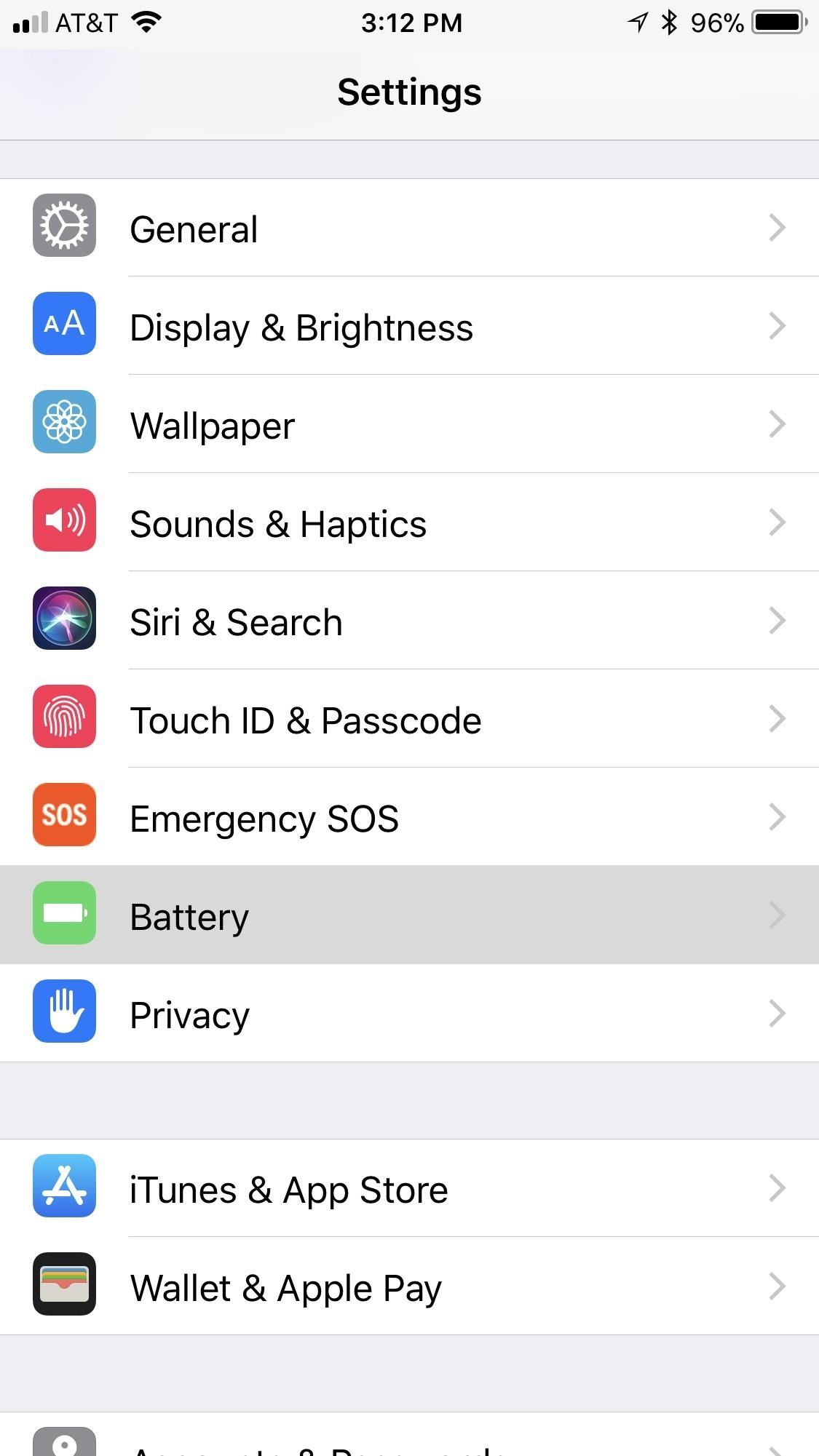
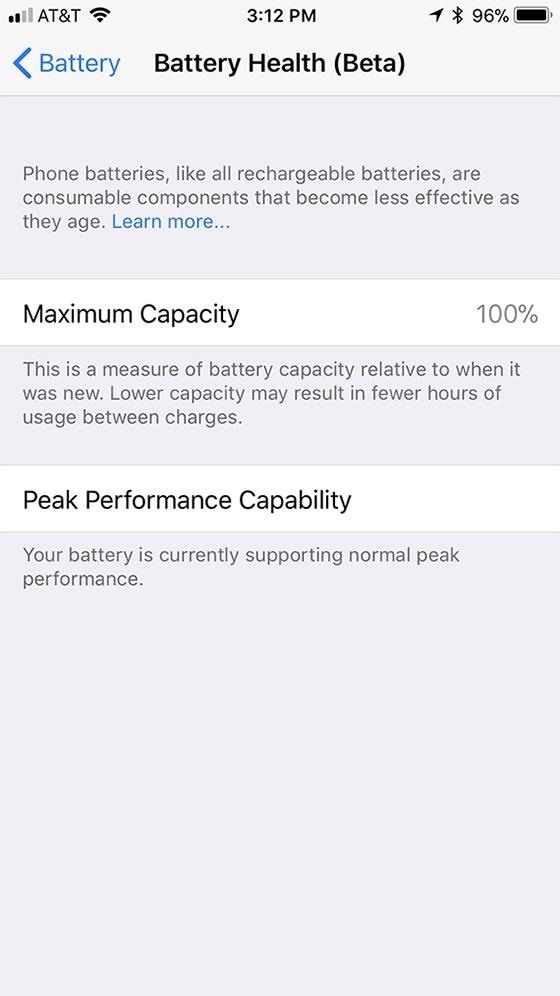
Before, the only way to really tell how your iPhone's lithium-ion battery was performing was to use tools such as Geekbench and Battery Life, but now Apple has included some quick battery health checks right into iOS 11.This feature is only available starting in iOS 11.3, so make sure you updated your iPhone to take advantage.Once you're running iOS 11.3, in order to see your iPhone battery's health data, go to "Battery" in the Settings app. You'll still be able to see the "Battery Percentage" and "Low Power Mode" toggles, as well the Battery Usage statistics that have been around since iOS 8. However, a new "Battery Health (Beta)" option will be available for you to dive into. After tapping on "Battery Health (Beta)," you'll see two new data points called Maximum Capacity and Peak Performance Capability, which we'll explain in more detail below.

Maximum CapacityWhen you first buy an iPhone or get a new battery, the percentage next to this option will read 100 percent. As the lithium-ion battery chemically ages, it will have a lower capacity when compared to new batteries. So, if your battery is reading 91%, you will probably have to charge your iPhone more frequently than you did when your battery was reading 100 percent.As lithium-ion batteries chemically age, the amount of charge they can hold diminishes, resulting in shorter amounts of time before a device needs to be recharged. This can be referred to as the battery's maximum capacity—the measure of battery capacity relative to when it was new.
— AppleApple claims that their batteries are designed to hold about 80% of their original capacity when 500 complete charge cycles have occurred under normal operating conditions (abnormal conditions include things such as extreme temperatures). A complete charge cycle is when you've used an amount of juice equal to 100% of your battery's capacity, which is unlikely to happen in one day.If the number you see in the battery health tool is below 80% and it's been less than one year since you've purchased the iPhone, you can have your battery service free of charge since it's still under Apple's one-year warranty. If it's past that one year, you will have to pay to have your battery serviced unless you have AppleCare+, which extends that warranty to two years.For those caught up in the performance-throttling fiasco, you can have your battery replaced for less than the normal cost without any warranty. For rare cases when battery health information can't be read, which could happen if the battery was installed incorrectly or there is an unknown part causing issues, it will inform you under the Peak Performance Capability section:This iPhone is unable to determine battery health. An Apple Authorized Service Provider can service the battery. More about service options…If your iPhone's battery does dip below the 80% threshold, it will give you the following message at the bottom of the "Battery Health (Beta)" page. Your battery is still fine as is, but your iPhone will run better with a newer battery.Your battery's health is significantly degraded. An Apple Authorized Service Provider can replace the battery to restore full performance and capacity. More about service options…

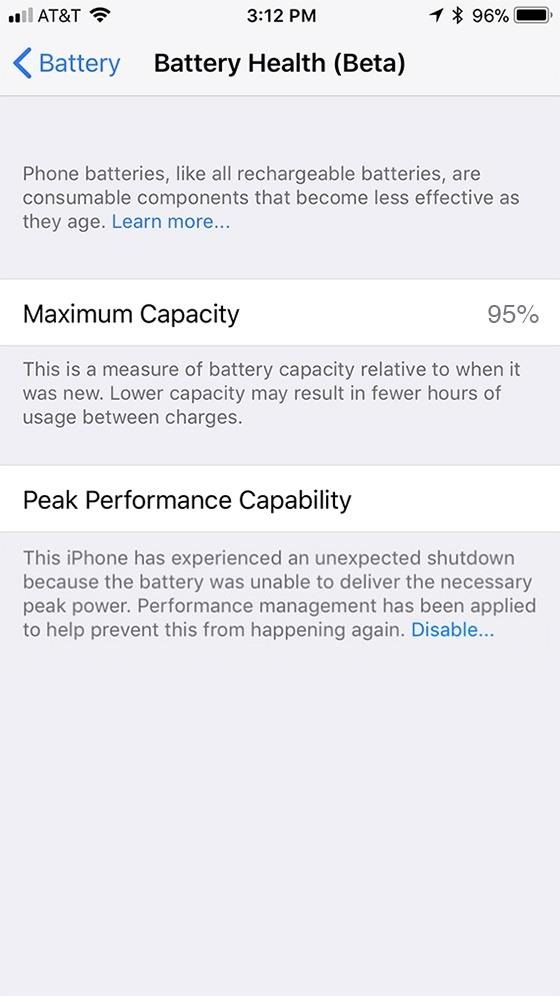
Peak Performance CapabilityWhen your Li-ion battery has degraded, it will be unable to deliver "peak power," i.e., the maximum instantaneous performance, to the iPhone at the same rate as when new. When the battery chemically ages, whether or not it's below 80% capacity or not, its impedance may become too high, resulting in a drop in voltage and the inability to continually power up the electronics in your iPhone. This is the issue that has been causing some iPhones to unexpectedly shut down. A low battery state of charge or cold temperatures can also cause these issues.This what Apple's power management system is for. When it realizes the battery is no longer strong enough to provide instantaneous power to all of the iPhone's innards, it will enable "power management protections" that dynamically manage the peak power so that the device will no longer shut down without warning. Of course, this causes the iPhone to lag, become dimmer, less loud, among other problems.This performance management works by looking at a combination of the device temperature, battery state of charge, and battery impedance. Only if these variables require it, iOS will dynamically manage the maximum performance of some system components, such as the CPU and GPU, in order to prevent unexpected shutdowns. As a result, the device workloads will self-balance, allowing a smoother distribution of system tasks, rather than larger, quick spikes of performance all at once.
— Apple If your battery is having no issues at all, it will say that "Your battery is currently supporting normal peak performance." However, if you're experiencing shutdowns caused by an older battery, low temperatures, or a low battery state of charge, it will say:This iPhone has experienced an unexpected shutdown because the battery was unable to deliver the necessary peak power. Performance management has been applied to help prevent this from happening again. Disable…You can tap the "Disable" link to turn off any throttling that is occurring, but if the iPhone should unexpectedly shut down again, performance management protections will be re-enabled automatically.More Info: How to Disable Performance Throttling on Your iPhoneThis iPhone has experienced an unexpected shutdown because the battery was unable to deliver the necessary peak power. You have manually disabled performance management protections.There is no way to turn throttling back on manually, so you'll just have to wait until it unexpectedly shuts down again for it to automatically turn back on. If that's the scenario, it's time to start thinking about getting a new battery for your iPhone.While these two new battery health tools in iOS 11.3 help determine when you need to have your battery replaced or serviced, you're still better of getting more advanced data from apps such as Geekbench, Performance Benchmark, and Battery Life. But if you don't want to deal with any additional tools, use this new data from Apple in conjunction with Battery Usage statistics to see what kind of apps are hurting your battery most.Don't Miss: How to Improve Battery Life on Your iPhone in iOS 11Follow Gadget Hacks on Facebook, Twitter, YouTube, and Flipboard Follow WonderHowTo on Facebook, Twitter, Pinterest, and Flipboard
Cover photo and screenshots by Justin Meyers/Gadget Hacks


Get yourself an Android phone or tablet and you can hack it to work in pretty much whatever way you want—and that extends to input as well. All In One Gestures is one of several apps on the
How to get iPhone X-like gestures on any Android device right


As a kodi user, we used to watch tv shows, movies, live streaming videos, PPV and much more. Watching these from your own IP address is totally risky. Also, few kodi add-ons are geo-restricted and can't be accessed by all the users. In order to get rid of such issues, a Kodi VPN is always recommended.
25 Best Kodi Movie and TV addons that Still Work [Tested May


Many computer problems are related to soft failures (or degraded performance) on the hard drive. The HP Hard Drive Self Test will repair soft errors on the hard drive, but it will not report the errors. After the test is complete, restart the computer to see if test repaired the problem you may been experiencing.
PLEASE HELP! Beeping and black screen when laptop turned on


Hello everyone, many of you have heard of this distro and i don't know if lots of people here have worked on it, but i'm making this tutorial for all the new guys to arch's world and i wanted to participate at something plus i didn't see any tutorial about it here, so let's start:
Android Basics: Check Your Phone for USB On-The-Go Support to


Pixolor is a great app if the color you want to identify is on your Android device's screen. A floating circle will appear over your display giving all the information you need to identify that color. This app is focused on designers since the app gives you technical pixel-level information.
Color Grab (color detection) - Apps on Google Play


You can free up a lot of space on your Windows 10 by clearing caches on Windows. So in this articles we are going to show how to clear all caches in Windows 10 so you can free up a lot of space.
How to clear all cache in Windows 10. Free up Hard disk space


No offense, but I posted this for people who use Firefox and would prefer it not to look so ugly, not to promote Firefox over Safari, and definitely not to start some browser dick-measuring contest. You prefer Safari. I like Safari a lot!
How to Make Firefox 57 Look Like Safari on Mac : firefox


For most Android phones, the system clock is set using a protocol called NITZ, which relies on a connection with your carrier to ensure that the time stays in sync. The trouble here is that this feature won't work when you're outside of cellular range, and a lot of times, the carriers themselves
Why isn't my 2FA token working? - CoinSpot


In the Logitech Gaming Software window, click the on the lighted, colored part of the mouse. In this example, the LED color is set to red, but it may be a different color on your computer. In the next window, look for the color wheel. The color with the glowing highlight is the selected color.
Amazon.com: color changing wireless mouse


You can personalize your messages by adding a note in your own handwriting. Your friends and family will see the message animate, as if it were being written in front of them. To send a handwritten note, follow these steps: Open Messages and tap to start a new message. Or go to an existing conversation. If you have an iPhone, turn it sideways.
How to Search iMessages/Text Messages on iPhone


The popup and ad blocking features in Chrome should be enabled by default, so if you're getting obtrusive ads while browsing, you'll need to check if these features have been disabled. To do so, tap on the three-dot button to the right of the address bar up top, then select "Settings" from the menu that appears.
How to Block Ads on Chrome Browser for Android?

Send or unsend Gmail messages - Computer - Google Support


Save your documents to OneDrive and you can access them on any of your devices wherever you are. But, there's even more you can do than just access them on the go. With Office 2013 on your computer you can open, work on, share, and collaborate on your Word, Excel, and other Office documents from OneDrive.
How to Access & Control Your Computer Remotely with Your Nexus 5