How To: Give Your Status Bar Stock Android's Material Design Icons & Matching Colors

How To: Give Your Status Bar Stock Android's Material Design Icons & Matching Colors
These days, the user experience on stock Android is a lot more refined and polished than manufacturer skins like Samsung's TouchWiz or HTC's Sense. This is mostly due to Material Design, the look and feel that Google implemented back in Android Lollipop, which has finally started to give Android a unified appearance with its sleek icons and abundant use of colors.To notice the difference, you needn't look any further than the status bar at the top of your screen. With stock Android, the icons are subtle and understated, while the background of the status bar matches the color of the app you're currently using. Manufacturer-skinned versions of Android, on the other hand, continue to use cartoonish icons here, and the status bar may or may not be color-matching, even if you're running Lollipop or higher.Luckily, though, developer James Fenn has come up with an ingenious way to get stock Android's status bar on almost any device. His latest app simply overlays a color-matching status bar on top of your existing one, complete with Material Design icons and theming. To top that all off, the app doesn't even require root, so this is one that anybody can try.

Step 1: Install StatusTo update your ugly old status bar with Material Design, start by installing Fenn's app, which is simply called Status.Install Status for free from the Google Play Store

Step 2: Grant PermissionsWhen you first launch Status, there are a handful of additional permissions that you'll have to grant so that the app can overlay your screen, display notification icons, and keep your connectivity indicators accurate. The app has a set-up screen that will walk you through this part, so it's pretty easy.To start, tap the "Grant Access" button beneath the first permission, then select the "Status Service" entry on the next screen. Next, simply enable the permission with the switch at the top of the screen, then confirm your choice on the popup. From there, press your device's back button to head back to the Status app. Next, just repeat this same process with the other two permissions, then press the check mark in the bottom-right corner of the screen when you're done.

Step 3: Adjust OptionsOnce you make it to the app's main menu, start by enabling the "Status Bar Service" switch. From here, make sure the "Status Bar Coloring" option is also enabled if you want your new status bar to match the color of the app you're using. In the event that the automatic color-matching fails or the app you're using has no color, you can set a default color with the "Status Bar Color" option, and this will be used as a fallback of sorts. The app does a good job of automatically matching the color of any app you're using, but occasionally, this can be off. If you notice any apps with mismatching status bar colors in the future, come back to the app's main menu, then tap the "Add Apps" button. From here, enable the switch next to any troublesome app, then use the sliders on the popup to manually adjust the status bar coloring for that particular app.

Step 4: Get a Color-Matching Material Design Status BarFrom now on, your status bar will be using Material Design, so you'll get the sleek icons and indicators, plus the color will match the app you're currently using. This only applies to the status bar itself, so when you expand your notification tray, you'll still see the stock interface—but, at the very least, you've finally gotten rid of that ugly old status bar. Follow Gadget Hacks on Facebook, Twitter, Google+, and YouTube Follow Android Hacks on Facebook, Twitter, and Pinterest Follow WonderHowTo on Facebook, Twitter, Pinterest, and Google+
Cover photo and screenshots by Dallas Thomas/Gadget Hacks


Not every mod you add to your Android will revolutionize the way you use it, but many of them can make things a little more simple and convenient for you on a regular basis, like sliding across the status bar to adjust brightness or swiping the screen to put your display to sleep.
Test Realm Status « The Wizard's Spiral :: WonderHowTo


The horizontal dotted icon in your iPhone's status bar serves as an indicator of your device's network strength. And while it does help provide an approximation of how strong your signal is, swapping it out to display an actual numeric value is a lot more precise and can change up the look of your iPhone (or at least the status bar).


How To: Tint the Status Bar to Blend in with Different App Colors on Your Samsung Galaxy Note 2 How To: Give Your Status Bar Stock Android's Material Design Icons & Matching Colors How To: Give Your WhatsApp Status Message a Makeover with GIFs, Photos & Videos
statusbar - How to change the status bar color in android


For the unaware, System UI Tuner let you choose which icons to show in the status bar. For the majority of the icons, you can simply turn it off or on, but there are some additional controls for time and battery. It is a great tool to give you a bit more customization, and it cleans up unnecessary icons which crowd your status bar.
Google Chrome 101: How to Unlock the Material Design 2 User


How To: Get Jelly Bean's GPS Status Bar Icon Back on Your KitKat-Powered Nexus Device How To: Give Your Status Bar Stock Android's Material Design Icons & Matching Colors News: This Is What Android Lollipop Will Look Like on Samsung Galaxy Devices
How to Hide Status Bar Icons on Your iPhone for a Cleaner


Update: Lollipop: public abstract void setStatusBarColor (int color) Added in API level 21. Android Lollipop brought with it the ability to change the color of status bar in your app for a more immersive user experience and in tune with Google's Material Design Guidelines.
The color system - Material Design


The Material Design color system supports alternative colors, which are colors used as alternatives to your brand's primary and secondary colors (they constitute additional colors to your theme). Apps can use alternative colors to establish themes that distinguish different sections.
Unlock a Hidden Network Strength Meter for Your iPhone's


How To: 4 Ways to Clean Up the Status Bar on Your Galaxy S6 (Without Rooting) How To: Give Your Status Bar Stock Android's Material Design Icons & Matching Colors How To: Mimic the iPhone's Status Bar on Your Android How To: Keep Better Track of Your Battery Life on the Nexus 7
How to Make Your Status Bar's Color Auto-Match Current Apps

How to Enable System UI Tuner on Android 9.0 Pie to Remove


Google's been using their "Material Design" look in Android for years now, but a change is coming up with "Material Design 2," their updated version focusing on new colors, icons, and spacing. Whether it'll be called "Material Design 2" or not remains to be seen, but you can try it out right now in Google Chrome on your Android device right now.
Get Lollipop-Style Status Bar Icons on Android Jelly Bean or


How To: Trick Out Your Galaxy S3's Status Bar with New Icons, Clocks, Colors, & More How To: Give Your Status Bar Stock Android's Material Design Icons & Matching Colors How To: The Fastest Way to Access the Notification Tray in Full-Screen Apps on Your Samsung Galaxy S3
Add an Indicator for Download Progress to Your Android's

How To: Inconspicuously Play Portal During Class on Your Graphic Calculator

How To: Inconspicuously Play Portal During Class on Your Graphic Calculator

The only bad thing about Portal is that you can't play it everywhere. You can't play it while camping, you can't play it in the car, and you can't play it in the waiting room at the dentists office (unless you lug around your laptop to all of these places. Weirdo).You definitely can't play Portal in the classroom. It'll be way too obvious. Unless you're in college where the lecture halls are huge and no one pays attention anyway. Image via flickr.com So what about the rest of us who want to enjoy all the goodness that is Portal (and Portal 2) during small, boring classroom lectures?Well, believe it or not, thanks to Redditor Builderboy2005, now you can play Portal on your graphing calculator!Playing game emulations on graphing calculators is nothing new. In high school, I used to play Super Mario on my TI-89, and I recently read an article where some kid used a calculator to play Pokemon via a Game Boy Color emulator.Well, you can now add Portal to the list of games with Portal Prelude. Obviously, it's not the original game, but it does come with many of the popular space-warping features you're used to. Image via technabob.com The game, which is only compatible with Texas Instruments TI-83 and TI-84, features 38 evasive chambers using Portals, plasma balls and electric fields.Check out the video below see how it plays. If you don't like spoilers, don't watch it all the way through—if you do, it'll ruin the fun of figuring out how to beat the levels. Please enable JavaScript to watch this video.
Check out the Omnimaga page for the download, and Builderboy2005's reddit thread for more details.
Photo by Assorted Stuff


Wow-Worthy Hack: Android Running on iPhone By Robin Mansur; Smartphones; David Wang of the iPhone Dev Team has achieved what is considered quite a jaw-dropping hacking feat. Yesterday Wang posted a video of Google's Android operating system up and running on an iPhone. Via CNET:
FULLY WORKING ANDROID ON ANY iPHONE! (NO JAILBREAK!) - YouTube


Alongside the first developer beta of iOS 12, Apple also released the first developer beta of watchOS 5. Being a developer beta, it is not available for regular users, and it is currently limited to users who have a developer Apple account. Thankfully, just like you can install iOS 12 beta on your iPhone right away, there's a trick to get the
How to Install watchOS 6 Developer Beta on Your Apple Watch

How to Clear Your Cache on Any Browser | PCMag.com


How to transfer everything from your old Android phone to your new one No one wants to spend forever moving all their stuff to a new phone. Here's a quick and painless guide to get you up and


How To Change The Zelotes 5500 DPI Gaming Mouse Colors From Cycling To One Solid Color! 7 Things That Can Change Your Eye Color 2015 Zelotes 5500 DPI 7 Button LED Optical USB Wired Gaming
Why are optical mouse LEDs red? - Super User


Tutorial - Change Galaxy S8, S8+, or Note 8 Navigation Bar Color. Follow this tutorial in order to set up ADB on your Windows, Mac, or Linux PC.; Open up a Command Prompt or Terminal window and
How to change your Galaxy S8 AND Note 8 Navigation - YouTube


There's no such thing as a perfect Android keyboard. Some, like Swype, have gesture typing down to a science, but lack in predictive technology. SwiftKey, on the other hand, boasts awesome next-word prediction, but less than stellar gesture typing.
How to Automatically Change your Keyboard on a Per-App Basis


Toolbox on Galaxy S5 is a new feature which gives you a quick access to up to 5 applications via touching a white floating button. Enable/disable and edit Toolbox on Galaxy S5 by doing as follows: 1. Open Settings application 2. Use the search box and look for "Toolbox" (You can also find it here: Settings >> Device >> Sound and Display) 3.
How To Get The Galaxy S9's Translation Feature On Any Phone


It might not be as big a deal for photos that stay on our hard drives but for those we share, a little caution is always a good idea. Meet EZ UnEXIF Free (EXIF Remover), a free Android app that removes all the EXIF data in a photo and saves it as a copy or overwrites the original one, according to your preference.
Smartphone Pictures, Exif, and Personal Privacy - Anti-virus
stopsign.com/blog/smartphone-pictures-exif-personal-privacy/
Find out more details on this blog: "How to Scrub the EXIF Data from Photos on Your Android Phone Before Sharing Them". The up side to all of this is that certain social networks such as Facebook and Twitter proactively strip out Exif data, but that can change in the future and I personally wouldn't trust it if you're really concerned
How to Scrub the EXIF Data from Photos on Your Android Phone


For those that own a Samsung Galaxy S7 or Galaxy S7 Edge, you may want to know how to use the Alarm clock feature. The Galaxy S7 Alarm clock does a great job to wake you up or remind you of important events. You can also use the clock as a stopwatch to keep track of time while on a run.
How To Set Alarm Clock On Samsung Galaxy S6 & S6 Edge


Phone Retro Handset (3.5mm) Mic Retro POP Cell Phone Handset For Mac Iphone Ipad,Nokia Gift item (BLUE), SANOXY Retro Handset combines old school style with new.., By SANOXY Add To Cart There is a problem adding to cart.
How to set up your headset in Windows 10 - Windows Central

How To: Get the OnePlus 3's Gorgeous New Wallpapers on Your Phone Right Now

How To: Get the OnePlus 3's Gorgeous New Wallpapers on Your Phone Right Now

The OnePlus 3 just launched, and if you're not sure about taking the plunge on the $399 budget smartphone, you can at least check out how the device's new wallpapers will look on your phone right now.Hampus Olsson, designer of most official OnePlus wallpapers, created four wallpapers just for the OnePlus 3, and each one looks pretty cool. Have a look: Images via Hampus Olsson If you'd like to give any of these wallpapers a try on your phone, just long-press on the image and hit "Save," and then set the downloaded image as your background image in your wallpaper settings. It varies by device, but you should be able to find this in your Settings under something like "Display" or "Sound and Display". Or you can probably just long-press an empty space on your home screen to bring up wallpaper options.Two of the new wallpaper designs are also available in 4K resolution on Olsson's website, Abstruct, along with a handful of other wallpapers that he's designed.Follow Gadget Hacks on Facebook, Twitter, Google+, and YouTube Follow Apple Hacks on Facebook and Twitter Follow Android Hacks on Facebook and Twitter Follow WonderHowTo on Facebook, Twitter, and Google+
Wallpapers, Wallpapers, & More WallpapersDownload the Android Marshmallow Wallpapers How to Give Each Home Screen Page Unique Wallpaper Top 8 Free Wallpaper Apps for Android Add Life to Wallpapers With Filters and Effects
Cover image via Hampus Olsson


News: Comparing the Best International Data Plans from All Major US Carriers How To: Use a mod to get unlimited money in Test Drive Unlimited 2 for XBox 360 News: Cord-Cutting Just Got Cheaper — AT&T's $15/Month WatchTV Service Is Coming Next Week
How to Stream Web Videos & Live TV to Any DLNA Media Renderer

How to Let others download photos from your MobileMe Gallery


This feature works because Google is holding the message on their server for the amount of time that you have specified before it gets sent. Once the message has been held for the specified amount of time, it is gone from Google, has likely reached your recipient's email server, and is out of Google's control. So, now that you see how Gmail


This is a quick tutorial of how to download music from soundcloud on android. Its a very simple process it is very handy if you are going to an area without an internet connection and you still
How To Download Soundcloud Songs On Your Android Device


You can interact with them individually within the group or operate the whole group at once. We are sure that all the above discussed new iOS 12 features will help you all a lot in operating the Apple products - iPad, iPhone, and iPod easily and in a better way.
30 Exciting New iOS 11 Features You Didn't Know About


iOS 11 introduces a new app switcher to move between and force close apps on your iPad. Swipe up towards the top of your screen thankfully still works-it just looks a little different than iOS10. And the App Switcher is still a quick and efficient way to change to other recently used apps easily
HOW TO: Close Apps in iOS 12 (iPhone & iPad) - YouTube


How To Use The New Instagram Algorithm To Customize Your Feed. Instagram is changing how photos appear on Perhaps the most obvious way to "customize your feed," and to ensure the
Full Guide: How to Create a Cohesive Instagram Feed Quickly


Firefox is also widely used on Android and provides an incognito browsing featur. To enable it, follow the steps below: Open Firefox, tap the three dots icon in the upper-right corner and select New Private Tab from the menu. It's also possible to directly open a link in a private tab.
Private browsing: how to use incognito mode on Android

How to Set the time in the Alarm Clock on the Samsung Galaxy Tab


Below we've put together a guide for how to downgrade your iPhone or iPad to the earlier iOS 11.4.1. How To Downgrade iOS 12 and Restore iOS 11.4.1 . Step 1: Be Prepared to Lose Some Data. iOS 12


Learn how to set up "Speed Dial" contacts that appear right on your Video Phone screen!

When you tap on the search bar in Safari on your iOS device, all of your favorite websites show up. Just tap on the one you want to visit and head over to it. Even better, you can quickly add or remove Favorites from Safari on your iPhone and iPad. "Favorites" is one of the most appreciated features in Safari.
iPhone tip: How to rearrange your phone favorites | here's


One thing that it's missing is the comments from the App Store, which can be useful in determining whether or not to download an app. Overall, though, uQuery is a much more efficient way to search for iOS apps, especially if you don't have iTunes installed on the device you're using.

How To: Unlock the Nexus 5 Bootloader & Start Modding Your Android Experience

How To: Unlock the Nexus 5 Bootloader & Start Modding Your Android Experience
You know what's awesome? You own a Nexus. That means, with Google's blessing, you have easier access and control over your device than other manufacturers allow. You can really dig in and do some interesting things if you root.The big 'R' word can be intimidating for the new and uninitiated, but it doesn't have to be. The process is a breeze once you get down to it, and it's not as daunting as it seems.In order to root and get into that fun stuff, though, the first thing you're going to have to do is unlock your bootloader. An unlocked bootloader is the first step on a journey toward full Android customization, and lucky for us, on a Nexus it's cake-slice simple. Time to get your feet wet. Please enable JavaScript to watch this video.
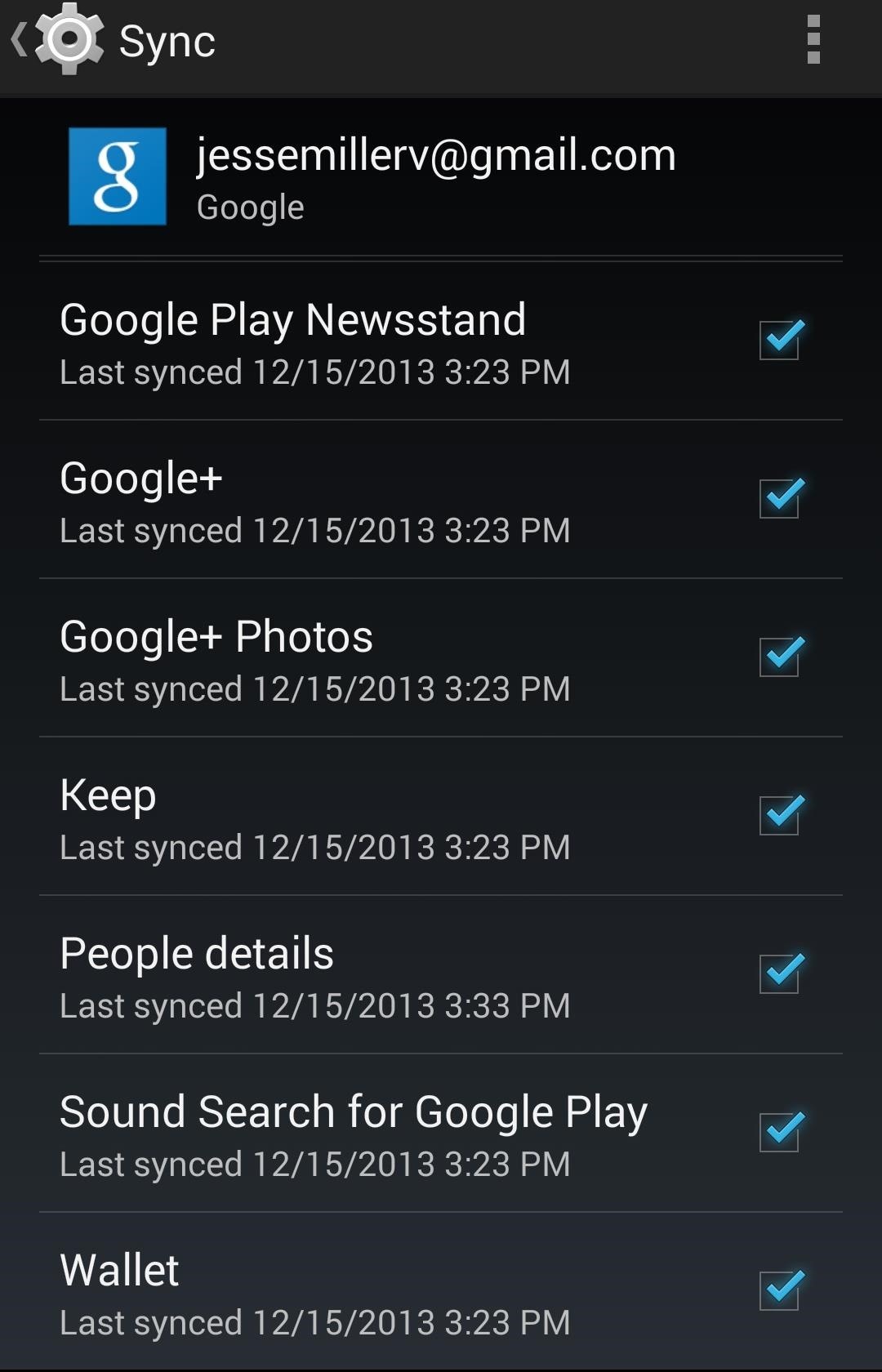
Step 1: Back Up What You Care AboutBefore you touch your bootloader, know this—unlocking the bootloader will erase all user data on your phone. It's the equivalent of a factory reset. It's a security thing. Since an unlocked bootloader allows for deep-level modification, erasing all of your data is the most surefire way to keep your stuff safe if someone gets their hands on your device and tries to break in.So before you proceed further, make sure you've backed up anything you need to keep around. If you're synched with your Google account, stuff like your contacts and emails will be safe. Any apps you've downloaded or purchased will be available to re-download in the Play Store afterward, as well. You can check what's synced under the Accounts section of the Settings menu. If you want to keep your photos, make sure you bring them over to your computer or upload them to Google Photos before continuing.There are also apps in the Google Play Store that will back up your SMS messages if you want to hold onto them. I recommend SMS Backup & Restore.
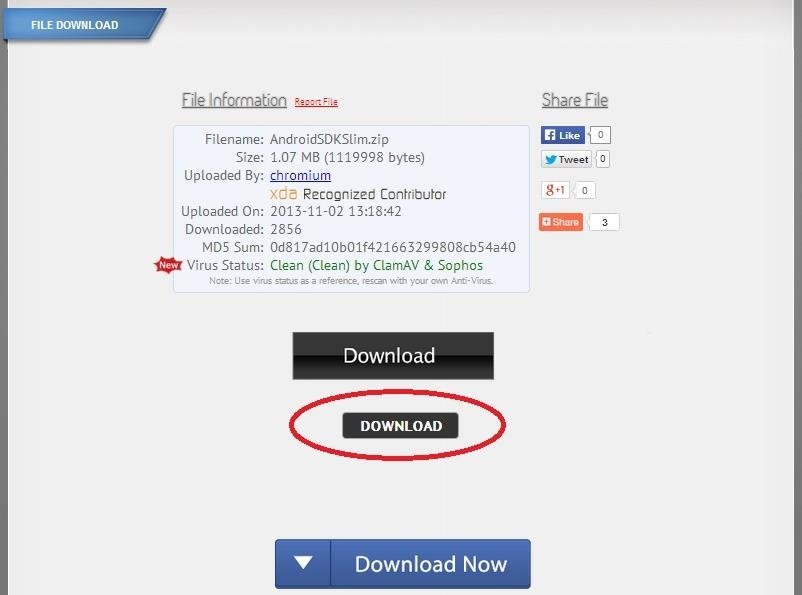
Step 2: Download Android SDK to Your Windows PCThe Android SDK allows your PC to communicate with your device. Downloading this toolkit allows you to issue the command to unlock the bootloader. You can download the full version from Google, or try out the slimmed down version of the essential tools, which I'll be using.If you chose the slimmed down version, too, be weary of ads on the download page. There might be multiple "download" icons on the page. Just make sure AndroidSDKSlim.zip is the only file being downloaded. You're going to need a program to unzip the file after it's been downloaded. There are a ton of programs that do this. WinZip works. So does WinRAR.
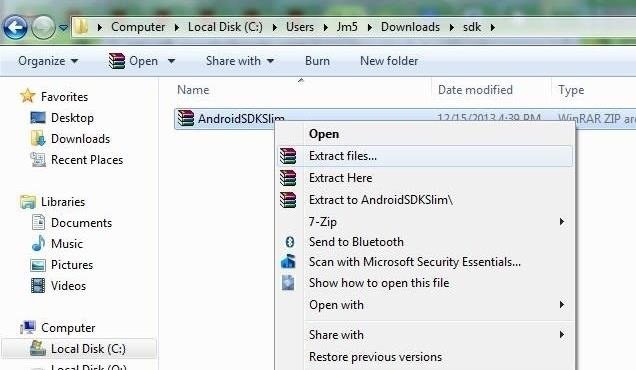
Step 3: Unzip Zip FileNow that you've downloaded AndroidSDKSLIM.zip, navigate your PC to the file. For convenience, it's best to create a new folder to unzip the file to. For example, for me, the file lives in my Download folder, and I created a new folder there called SDK to find it more easily, then dragged the .zip file and unzipped from within that folder. Image via wonderhowto.com
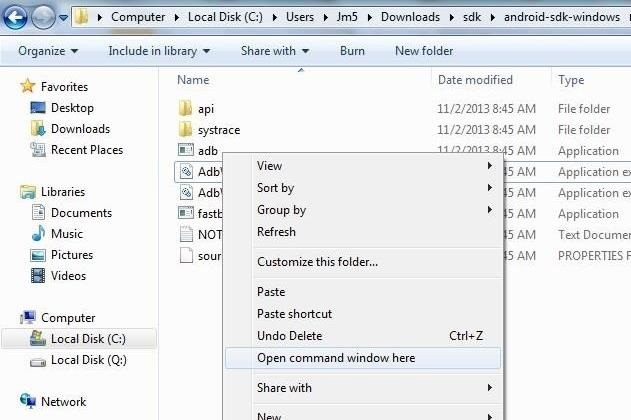
Step 4: Confirm with Command PromptUnzipping the file will reveal a folder that reads android-sdk-windows. Enter the folder, then platform tools. You'll now see files and folders that read:api systrace adb AdbWinApi.dll AdbWinUsbApi.dill fastboot NOTICE source.properties While on this screen, hold down the Shift key and right-click, then click on "Open command window here." Image via wonderhowto.com In the terminal that opens, enter the following command:adb version You should now a response that says Android Debug Bridge version 1.0.31. Image via wonderhowto.com

Step 5: Enable USB Debugging on Your NexusTo allow our Nexus to communicate with our PC, we'll need to enabled USB Debugging on the phone, which can be found in Settings -> Developer Options.If you don't see any Developer Options on your Nexus, go to Settings -> About phone. Scroll to the bottom to Build number and tap it several times. Keep tapping until a popup message reads, "You are now a developer!"
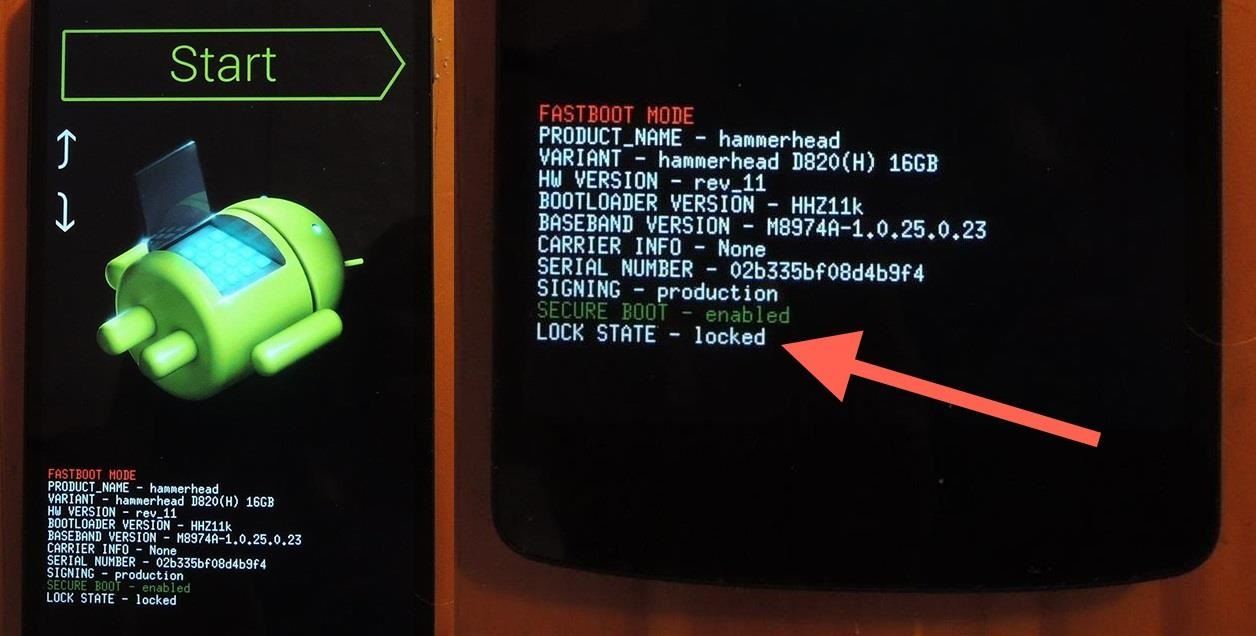
Step 6: Boot Phone into Fastboot ModePower down your device, then hold in the Volume down key and press the Power button simultaneously. You'll see an image of the beloved Android mascot opened up on his back. You should also see a string of text. Do you see at the bottom it reads, Lock State - locked? That's what we're going to be changing.

Step 7: Unlock BootloaderConnect your Nexus to your PC with your Micro-USB cord. On your PC, navigate back to platform tools in the android-sdk-windows folder. Remember, you should be looking at this:api systrace adb AdbWinApi.dll AdbWinUsbApi.dill fastboot NOTICE source.properties Open up the terminal again, if you've closed it, by holding in the Shift key, right-clicking, and selecting, "Open command window here." In the terminal, type in the following command:fastboot devices The command should list connected devices. If you see your phone's serial number, you're ready to rock. If you don't, check out the troubleshooting section at the end of this guide. Now to unlock the bootloader, type in the following command (and remember—unlocking your bootloader will wipe all the data on your phone!).fastboot oem unlock You'll get a message on your phone asking to confirm the command. Use the Volume keys to highlight Yes, then use the Power button to confirm.
Step 8: Reboot with Fastboot CommandAfter you've confirmed the fastboot command on your phone, enter this command into the terminal:fastboot reboot This will reboot your phone and finish the process. You'll get a progress bar on your Nexus while this is happening. It could take about ten minutes. Don't touch or unplug your phone from your PC while this is happening!You're done! Your bootloader is now unlocked and you're free to install a custom recovery and root to your heart's content. Remember, an unlocked bootloader is the first step on an exciting mod journey. Things will only get more interesting from here.
TroubleshootingIf your device is not listed when you run the fastboot devices command you most likely do not have the proper drivers installed on your PC. You can remedy the situation by installing the Universal Naked Driver (the latest version is Universal_Naked_Driver_0.73.zip).If you need any further help, comment below and I'll try and help you out.


Ok so my stupid friend let his brother use the storm with Cricket and they flashed the software so that the signal now picks up Cricket service. Now that his brother doesn't need it anymore, the phone is useless so he gave it to me since I'm with Verizon. So I tried to have Verizon "reflash" it back
Cricket Blackberry Sold Direct on eBay | Fantastic Prices on Cricket Blackberry
AD


A simple and easy tutorial teaching you how to apply the new Substratum OMS themes on your Android phone using the Substratum Theme Engine.
Get a New Look on Android with Nougat's Hidden Theme Engine


Android Pie vs Android Oreo: app AI. Android 9 Pie is smarter than Android 8 Oreo. It predicts the features you'll want, and puts them in front of you before you go looking for them.
How to Stop Oreo Battery Draining and Extend Battery Life


How To: Get Chat Head Bubbles for Text Messages on Your Nexus 5 How to Make Propane Bubbles: Fire You Can Hold How To: Get Floating Chat Head Notifications for All Apps on Your Samsung Galaxy Note 2 How To: Use Facebook Chat on Your PS3
Android Q adds hidden native "chat head" bubbles for all


Should you put your Instagram Hashtags in the first comment? Scrolling by some of your favorite Instagram feeds and noticed a trend of Instagram users putting a group of hashtags in the first comment, instead of in their image caption? Feel like you've missed some secret trick and overwhelmed? We know why people put hashtags in the first comment.
Why You Shouldn't Use More Hashtags on Instagram If You Want


We show you exactly how to unblock someone on Facebook, step by step. do is open the Facebook app you have on your Android device. is that once you unblock someone, you can't block him
Block and Unblock Facebook Applications

News: In Just a Clik, Turn Your Smartphone into a YouTube Remote for Any Web Display News : DIY Smartphone Macro Lens How To : 6 DIY Gift-Wrapping Ideas for the Holidays
With Clik, Your Smartphone Can Control Screens Everywhere


Clear Temporary Internet Files - BlackBerry® Bold™ 9650 Smartphone. This can help if you're unable to browse the Internet or a web page won't display. To determine Device Software Version, refer to View Phone Information. Device Software Version 5.x Device Software Version 6.x . Device Software Version 5.x. From the Home screen, press the
How to clear the BlackBerry Browser cache on a BlackBerry


How To: Trick Out Your Galaxy S3's Status Bar with New Icons, Clocks, Colors, & More How To: Give Your Status Bar Stock Android's Material Design Icons & Matching Colors How To: The Fastest Way to Access the Notification Tray in Full-Screen Apps on Your Samsung Galaxy S3
Add an Indicator for Download Progress to Your Android's


And if you don't use that system to send the messages for the next fourteen days, you'll automatically be signed out for security reasons. 3. How To Send Texts Via SMS websites. It may sound somewhat dull, but there are websites that can help you to send text messages from your computer.
How to Send an Email from Yahoo! Emailing Site: 6 Steps


How To: MAKE BALLOON ANIMALS THE EASY WAY How To: MAKE BALLOON SWORDS THE EASY WAY News: Who Needs Clowns? 3D Printer Lets You Print Inflatable Rubber Balloon Animals How To: make balloon headphones! News: Great Books for The Balloon Artist and Entertainer
Pet Feeder Entered in Instructables 3D Printer - WonderHowTo


How to enable lock screen gestures on your phone to launch applications directly from the lock screen? Different Android devices have different lock screen designs. Pure stock Android has a simple user interface with the unlock button on the middle and Touchwiz has fancy lock screens with water, light and ink effects.
Use the Google Now Gesture to Launch Any Android App

How To: This Mac App Uses Your Webcam to "See" If You're Still There Before Putting It to Sleep

How To: This Mac App Uses Your Webcam to "See" If You're Still There Before Putting It to Sleep

Most of the time, if you're actually using your computer, it won't just go to sleep on you. But when you're reading a long article or watching a video and don't move the mouse or use the keyboard for a while, the screen automatically dims or goes into sleep mode.It may not be the worst thing you'll face all day, but it is annoying, especially if you have to enter a password each time to wake it up. A free Mac app called Should I Sleep can fix this first world problem by using your computer's camera and microphone to detect whether or not you're still there before allowing it to enter sleep mode. Image via com.br Should I Sleep comes with face detection and a manual timer mode that allows you to prevent sleep for a certain amount of time. You can add additional sensors via in-app purchases, such as the microphone and a network traffic monitor that keeps your computer awake if you're uploading or downloading something (or watching a video). Image via apple.com Since it only activates when your computer is about to go to sleep, the app isn't hard on your battery or CPU. In the few seconds before the computer enters sleep mode, Should I Sleep activates the camera for about 3 seconds before determining whether or not it should sleep. Image via apple.com It's definitely not a necessity, but it's a simple solution to a very common annoyance. You can grab Should I Sleep for free over on the Mac App Store.
Photo by dotshock/Shutterstock


News: Thanks to Google, iPhone Users Can Finally Pick a New Frame for Their Live Photos How To: Take Perfectly-Framed Photos Every Time on Android How To: Use Magic Bullet Frames after Effects plug-in How To: Create a wood photo frame in Photoshop
How to Bring Apple's 'Live Photos' Feature to Your Android


How to Glitch into the Big Brother House (easiest method) Never Patched Kuchisake- Onna. Storm Watch - Duration: 7:35. Big Brother 417,858 views. 7:35. GLITCH THROUGH WALLS IN JAILBREAK! NEW
How to glitch into the Big Brother house on roblox!! - YouTube


SUAOKI Led Camping Lantern Lights Rechargeable Battery (Powered by Solar Panel and USB Charging) Collapsible Flashlight for Outdoor Hiking Tent Garden (Emergency Charger for Phone, Water-Resistant) 4.1 out of 5 stars 1,080
Solar Battery Charger
AD
Onlybatteries.com
Report Ad
Universal solar battery chargers. Recharge aa,aaa,c,d and 9 volts


Find out which Android apps are actually running in the background and learn what you can do about it. issues on your Android device, or trying to track down suspicious battery drain, then you
How to Fix Google Play Services Battery Draining Problem

How to download audio from youtube to your iphone - YouTube


Beware of downgrading bootloader to 3.9 using ZiPhone, it is irreversible. You might end with that bootloader forever!! iPlus uses a fakeBL which is reversible! Don't ever restore to 1.0.0 or 1.1.1 though, it will hurt your iPhone for sure!
How to unlock an iPhone without knowing the Apple ID or


The only thing you need in order to remove the SIM card in your iPhone or iPad is an Apple SIM card remover tool (included in the box in some countries, especially when you buy an unlocked device) or a small, bent paper clip. If you're using a paper clip, straighten the long end until it projects out (see the photo above).
3 Ways to Switch SIM Cards - wikiHow


In this video tutorial I will be showing you how to easily add a Logo Watermark to all of your YouTube videos. This watermark will also serve as a Direct Link right to your Subscribe button on
How to Add a Logo or Watermark to Your YouTube Videos


How To: Change Your Primary Shipping & Billing Addresses on PayPal to Avoid Purchasing Mishaps How To: TAP Card Dissolved! How to Use Acetone to Transfer an RFID Tag to Your Phone How To: Gift iOS Apps, Games, Movies, Music, Books & TV Shows to iPhone Users
Nelson Aguilar's Profile « Wonder How To


Download Free Video Downloader for Firefox. Help you download videos from web sites. it's free, safe, fast and easy to use.Help you download videos from web sites. it's free, safe, fast and easy to use.
Download Firefox — Free Web Browser — Mozilla


I would not say hidden features as most are well known to a hyper-v user but this is a good summary of it more advanced features. One great side feature (not hyper-v per se) is the ability to mount Macrium Reflect image backups as a hyper-v vm using Macrium Viboot. You can run vm, modify it eg add new programs and save as new image backup.
10 hidden Hyper-V features you should know about! - Microsoft


Like all apps, you can find a copy of the phone's web browser in the apps drawer. A launcher icon might also be found on the Home screen. Chrome is also the name of Google's computer web browser. An advantage of using Chrome is that your bookmarks, web history, and other features are shared between all copies of Chrome that you use.
Motorola Droid-how do you set it so that mobile web pages are


How to Fold a Pocket Square: The Ice Cream Mountain (Animated Guide) How To: Make a Totally Geeky LED Pocket Watch That Tells Time in Colors News: Canning Mission Warning! News: Survival mode Confirmed for Minecraft Pocket Edition! News: Overhead Camera Boom Made with PVC Pipe How To: Fold a Pentakis Dodecahedron News: Pick Pocket
You've got to pick a pocket or two « Jackass 3D Contest


If you have already performed jailbreak on your device, then you can easily restart it with an Activator gesture. Though, this method will only work for jailbroken devices. Simply choose an Activator gesture of your choice to restart iPhone without Power button. Learn how to restart iPhone without button using Activator by following these steps. 1.
Five Ways to Restart Android Phone without Power Button


In the clip below, UC Davis researcher Dr. Oliver Kreylos demos the process. The fun stuff begins at the :44 mark. Kreylos explains, "By combining the color and the depth image captured by the Microsoft Kinect, one can project the color image back out into space and create a 'holographic' representation of the persons or objects that were
The Latest and Greatest Kinect Hacks « Hacks, Mods

How To: Get Crowd-Sourced Tech Support for Any App on Android

How To: Get Crowd-Sourced Tech Support for Any App on Android
As with any software, Android apps can occasionally suffer from bugs. But finding the root cause of such issues can often be difficult, and reporting bugs is a cumbersome experience.A new app from developers Matt Hall and John Watkinson is looking to help solve some of your issues with installed apps by putting users in touch with one another. By providing a public chat room for every app you have installed on your device, you'll be able to ask your fellow users for a little tech support. Please enable JavaScript to watch this video.

Step 1: Install AppChatTo begin, head to the Google Play Store, then search for and install AppChat for free.

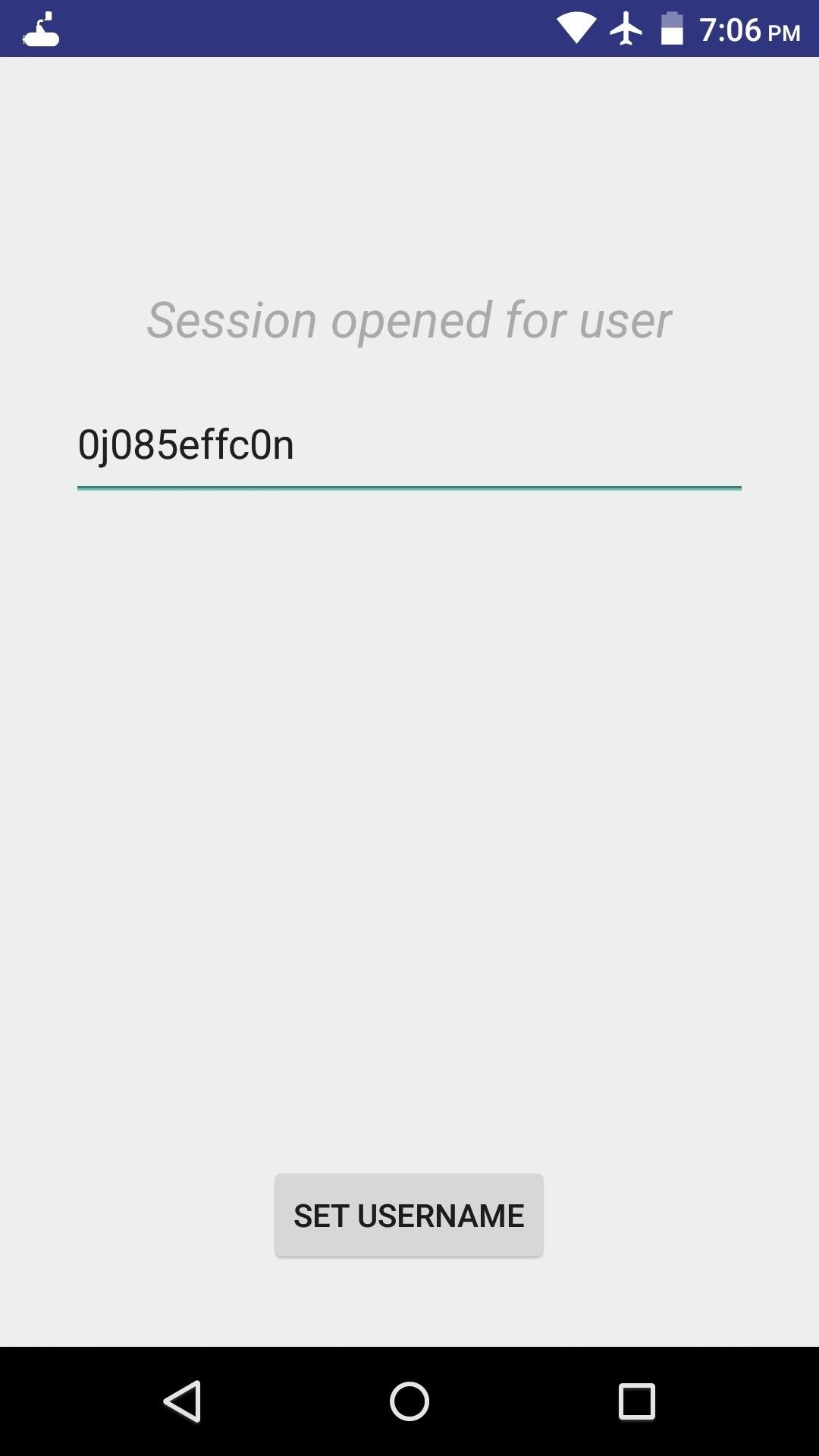
Step 2: Log into ChatWhen you first launch AppChat, you'll be asked to enter a user name. I've found this to be a bit finicky, so I would recommend that you leave the automatically-generated username in place, then simply tap the "Set Username" button.

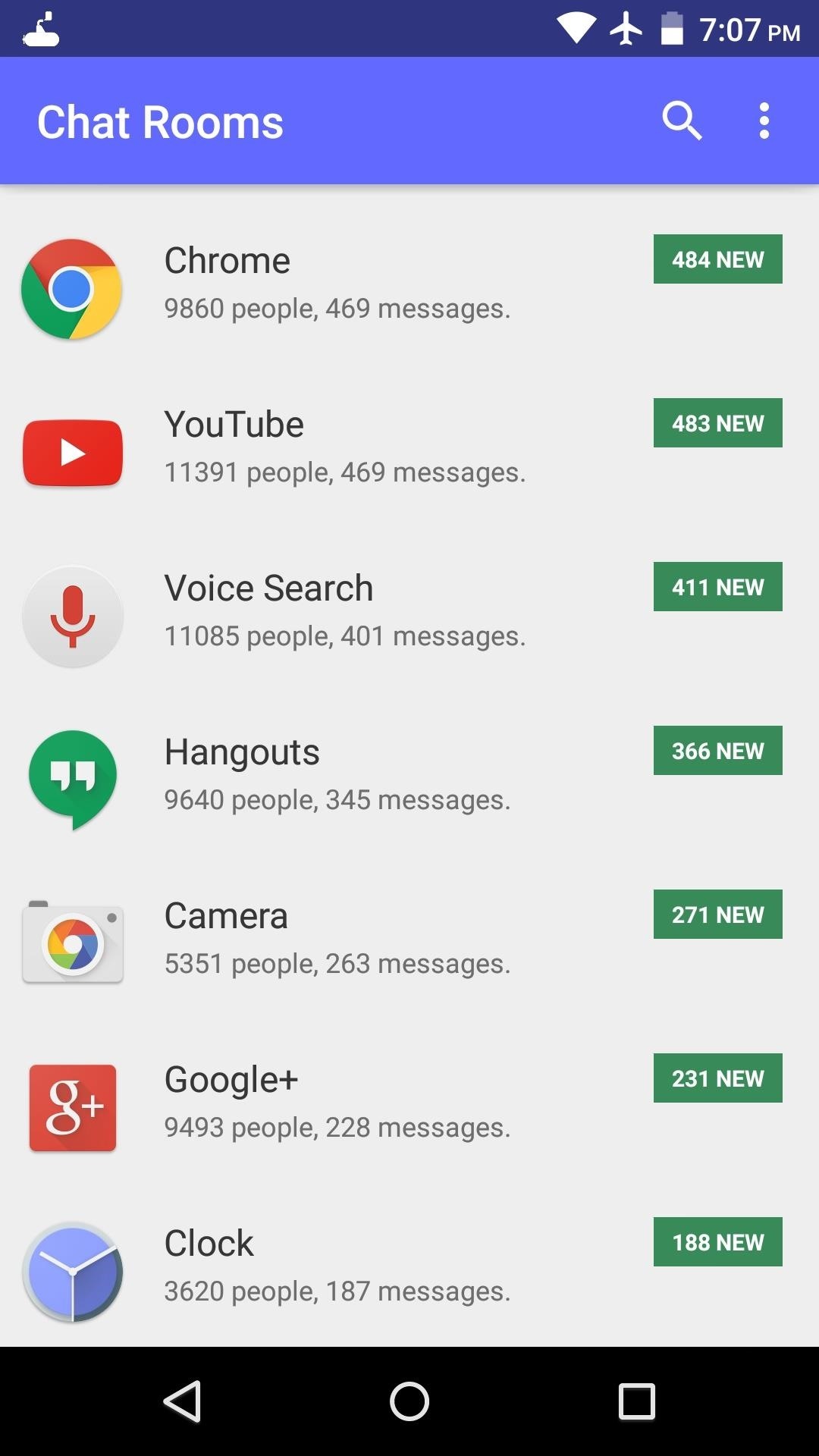
Step 3: Chat with Users About the Apps You Have InstalledAt this point, AppChat will generate a list of all your installed apps. If you're having difficulties with one of them, just tap its entry from this list. From here, you can chat with other users who have this same app installed on their device. The app communities are already rather large, so you should find plenty of users in the chat rooms to help you with any issues you're experiencing. AppChat has another great feature—any time you take a screenshot of an app, you'll see a "Screenshot Detected" notification. Tap this notification, and the screenshot will automatically be loaded up in the app's chat room. This should be very helpful if you're trying to nail down a particular issue that's hard to describe. Has AppChat already helped you solve some issues you were experiencing with your installed apps? Let us know in the comment section below, or drop us a line on Android Hacks' Facebook or Twitter, or Gadget Hacks' Facebook, Google+, or Twitter.


3 Ways to Hard Reset Android Without Volume Buttons Smartphones are very popular and have become an important part of our lives and it is especially Android devices that take the crown for being the most used smartphone devices in the world.
24 hidden Android settings you should know about | Popular


Urgent need to know today April 22 how to block MSMS and MMS to my Alcatel Pixi 4 Touch. Please. The › See More: How to block SMS on ALCATEL
How do i send picture text with my Palm Treo 700 - Fixya


How To: Delete temporary internet files on a BlackBerry smartphone How To: Secure Your Facebook Account Using 2FA — Without Making Your Phone Number Public News: Top 10 BlackBerry OS Secret Codes for All BlackBerry Phones
3 Ways to Clear Temporary Internet Files on Android Devices


How To Watch Full-Length Movies on YouTube for Free - But Not For Long. markhachman / 07 Aug 2012 / Web. Like a Hollywood sequel, pirated movie hits are back on YouTube - and this time they
The 13 Best Free Movies on YouTube - lifewire.com


How To: Add, hide and remove home screen widgets on a Nokia N97 How To: Set up a new email account on a Nokia N97 smartphone How To: Use the home screen on a Nokia N97 mobile phone How To: Use handy shortcuts on a Nokia N97 Mini smartphone
How To Add Widgets To Your Home Screen (for Android) - YouTube


How to Transfer Data from Android to iPhone (iPhone 8 (Plus)/X) with Move to iOS (Restricted) The Tool You Need to Transfer Data from Android to New iPhone. If you prefer a 100% safe & efficient way to transfer data from Android to iPhone, then this #1 Android to iOS data transfer tool - AnyTrans is your first choice. Now, let's check it.
5 Ways to Transfer Everything from Old iPhone to Your New


While you had to opt into notifications grouped by apps back in iOS 9, you don't have to opt into anything in iOS 12 to get grouped alerts on your iPhone. By default, they are set to "Automatic" grouping for each application — neat, organized stacks that significantly declutter your Notification Center and lock screen.
How to Group Notifications by Apps - ios.gadgethacks.com


This guide will help you learn how to back up data on your Samsung Galaxy Note 5 (#Samsung #GalaxyNote5) just in case you will encounter problems that would require a hard reset in the future.
Here's how to transfer all the important data from an old


I agree the Google Voice Dialer is horrible! I was able to restore the Android Voice Commands on my Droid Razr Maxx by doing the following: Go to Manage Apps, then swipe over to All apps. Look for Google Search then Disable it. This is probably all you need to do, but I went about it probably the wrong way by also doing the following.
How to Use Google Voice as a 'Burner' Number - Smartphones


But if you are wondering how to check your iPhone X shipment status and track it without having the tracking number then, there is a workaround available at the UPS website. Just follow the below steps to track your iPhone X shipment status right now and ahead of Apple. HOW TO : Track Your iPhone X Pre-Order Shipment Status without Shipping Number
Track your device order | T-Mobile Support


iOS 13 Beta. iOS 13 Beta: Early (Developer) and Late (Public) June 2019. For those daring enough to test unfinished versions of iOS, Apple makes beta versions available to developers on the same day as the keynote (which require a Developer Account, which costs $99). Apple has been offering public betas, which are slightly more stable, since 2016.
Neurable Releases Limited Beta SDK for Brain Control


How one simple hack can turn your Amazon Echo into a spy device. (TechRepublic) This Amazon Echo hack can make your speaker spy on you, How the Kentucky bourbon industry is going high tech.


Set Custom Navigation Bar Icons Now that you've set up the Custom Navigation Bar app, you can play around with the settings and change the navigation bar icons on your phone. For demonstration, I'll change the icons on my Nexus 5X to those of Galaxy S8.
How to Change App Title Bar Colors in Windows 10 - Gadget Hacks


Discuss: 7 settings to change right away on iOS 11 Sign in to comment. Be respectful, keep it civil and stay on topic. We delete comments that violate our policy, which we encourage you to read
Windows 10 settings you should change right now - CNET

How To: Turn an Automatic Air Freshener Dispenser into a Silly String Launcher

How To: Turn an Automatic Air Freshener Dispenser into a Silly String Launcher

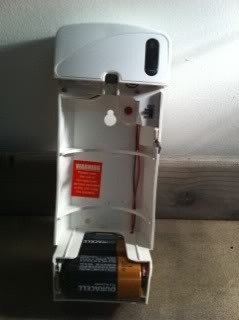
The electric air freshener is one of those devices that seems like it could only have one possible function, but can actually be repurposed in a few different ways. If you're looking for a practical use, you can turn it into a bug killer, but it's also perfect for pranks.With a super simple mod, you can make what would be more appropriately called a room UN-freshener. Or, you can take a cue from Calvin over on HalloweenForum.com and turn your electric air freshener into a DIY silly string launcher.Start by removing the cover and the top faceplate so you can see the motor and wires, then take out the circuit board. Images via photobucket.com Next, solder the ground from the battery to the ground from the motor, then attach the positives to a switch. Now, just put a can of silly string where the fragrance spray goes, replace the covers, and start making your list of targets! Images via photobucket.com Calvin used a push-button momentary switch for his, but if you wanted to make it more fun, you could easily use a motion sensor instead. Think of all the kids you could scare on Halloween by hiding it on your doorstep!For more details, plus a video of the silly string launcher in action, check out Calvin's post.


When you use hashtags in your posts, you let Instagram know to put your post in the appropriate folder in case anyone searches for it. With approximately 70% of Instagram content going unseen and out of user's feeds, hashtags help increase discoverability.


Due to its constant delays and lack of public invites, the OnePlus One is the equivalent of a unicorn in the Android community. I was lucky enough to win an invite in the OnePlus Storm of Invites promotion and have loved every minute with my new Nexus Killer since receiving it.
How to root the Galaxy Note 5 and install a custom recovery


Verizon to pre-install a 'Spyware' app on its Android phones to collect user data March 30, 2017 Mohit Kumar If the death of online privacy rules wasn't enough for Internet Service Providers and advertisers to celebrate, Verizon has planned to pre-install spyware on customers' Android devices in order to collect their personal data.
How Microsoft is turning Android into the mobile OS for


Now you know that as long as you're using Android Oreo, Adaptive Icons will be there. You can't simply erase them from your phone in any way. But, there's a way to at least change the appearance of Adaptive Icons on your phone.


If your Android phone comes with a small amount of internal storage, here's how to move apps to a microSD card and free up more space.
Files To SD Card - Apps on Google Play


The Full Capacity of Your Samsung Galaxy S8's SD Card. an hour of video that uses every pixel of resolution will take about 4GB. you need to do a little bit
Samsung Galaxy Camera Tips & Tricks for Getting the Best


Google has incorporated food ordering features into its mobile apps, allowing iOS and Android users to order food directly from a range of companies without having to install an additional app or
Google - The Verge


It has 3 pictures of a thin, blonde woman in lingerie with a gun, and half naked with jeans. You can't see the face at all but I believe it's very possible these could be pics of sp. I did a Google search for each of the photos to the best of my knowledge on how to do that on mobile and nothing came up meaning these aren't stock photos.
Gooby (2009) - Gooby (2009) - User Reviews - IMDb


How To: Get Quick Access to Almost Any System Function on Your Android Nova Launcher 101: How to Add Any Widget to Android Oreo's Expanded Dock How To: Monitor the Battery Levels of All Your iPhone Bluetooth Accessories with Just a Swipe
How to Change the Color of Android's Clock Widget « Nexus


News: Break Free from Your Smartphone Addiction by Turning Your Phone to Grayscale How To: Theme the Android System UI on Your Nexus 5 How To: Sync & Dismiss Notifications Across All Your Android Devices & Computers News: This Guy Got Android Running on a Nokia Lumia Windows Phone


How To: Your Android Device Can Help Save Lives While You Sleep: Here's How to Help Out News: Android Lollipop—All the New Features You Need to Know About How To: Block Apps from Logging Your Data on Android How To: Just Got a New Android Phone? Here's All the Apps & Info You Need to Get Started
Wearable Android gadgets that can save your life - Komando.com


Well your friend's won't stop dissing your BlackBerry Storm, and you need to show them it can actually play some games. This video shows how-to install the Gameboy emulator on your BlackBerry Storm so that you can play a whole host of cool video games.
Gameboy Advance emulator for Blackberry? - BlackBerry Forums


News: Sony's Xperia XZ2 Premium Is Coming to the US with a 4K HDR Display & Dual Cameras News: Sony's New Xperia Comes with the Best Selfie Camera Ever How To: Transform Your Android into a Sony Xperia Z3 News: Sony Brings Android N to Xperia Z3 Phones—Will Other Manufacturers Follow?
How to Get the New Sony Xperia Z2 Launcher on Your Nexus 5


News: Samsung Could Lose Grip on OLED Monopoly Thanks to Google & Apple How To: Control Your Samsung Galaxy S5 Using Gestures When the Screen Is Off News: 5 Things We Learned from the Pixel 2 XL POLED Debacle
How to Get That Stock Android Feel on Samsung, LG & Other