Xposed 101: How to Install Unofficial Modules

Xposed 101: How to Install Unofficial Modules
The Xposed Framework has an official repository for downloading modules which can be easily accessed by searching the Download section in your Xposed Installer app. But not every module is available on the Xposed repo — in fact, many unique and interesting modules are only hosted on third-party servers.The process of installing unofficial modules is slightly different than installing a module from the Xposed repository. On top of that, it can be hard to find these types of modules sometimes, and you always have to worry about whether or not you can trust the download source. So below, I'll show you the best places to find unofficial modules, then I'll explain how to install them.Don't Miss: How to Install the Xposed Framework on Android Lollipop or Marshmallow

Finding Unofficial ModulesFirst, let's address the question of where to find unofficial modules. Because there are many shady download links floating around, there's really only one place we recommend for this: XDA.However, there are a couple of different places on XDA where you can look for unofficial modules. Our first recommendation is this thread, which was created by one of our favorite Xposed developers, GermainZ. This thread contains a categorized view of all Xposed modules that have been posted to XDA, though note that some may also be hosted on the official Xposed repo.If you don't find what you're looking for in that thread, then the next-best place to go is the Xposed Modules forum on XDA. Here, you'll find pages and pages of threads, and each thread is dedicated to a specific module. Again, some of these may also be hosted on the Xposed repo, but if there are any unofficial modules that suit your needs, you'll find them here.Once you've found a module that you like, look for a download link towards the bottom of the first post in any linked thread. The modules are regular APK files, so go ahead and grab the most recent version available and proceed to the next section of this article. (1) GermainZ's list of Xposed Modules from various sources. (2) The XDA Xposed forum. (3) Downloading an unofficial module.

Installing Unofficial ModulesAfter you've grabbed the APK, launch it from your favorite file browser or by tapping the Download complete notification. From there, just press "Install" on the prompt, and once you've done that, the rest of the process will be exactly the same as installing from the official Xposed repository, so just make sure to activate the module and reboot. What are some of your favorite unofficial Xposed modules? Tell us about them in the comment section below, and don't forget to drop an XDA link for other interested readers!Don't Miss: How to Install Alpha, Beta & Pre-Release Xposed ModulesFollow Gadget Hacks on Facebook, Twitter, Google+, YouTube, and Instagram Follow WonderHowTo on Facebook, Twitter, Pinterest, and Google+
Cover image and screenshots by Dallas Thomas/Gadget Hacks


How to Clear Cookies in Firefox. This wikiHow teaches you how to delete all cookies from your Firefox browser on a computer or a mobile item. Cookies are small files which save pieces of information about your browsing; if you want to
How to clear the Firefox cache | Firefox Help


Skip the battery tester and use this quick and easy way to test if your batteries are dead: Just drop them. The video above by electrical engineer Lee Hite explains why dead batteries bounce, in

How to Make a USB-powered Furby - Hacks, Mods & Circuitry


The Ring/Silent switch on the side of the iPhone has always had one purpose—to toggle ring mode/silent mode. But in iOS 9, Apple gave us another choice, and that's locking the orientation of the screen. This could be a great new feature for some of you. Personally, I usually have my phone on
How to Disable the Ring/Silent Switch on an iPhone | It Still


15 Best Hidden Google Easter Eggs and Games You Should Know 1. Starcraft . A game that will keep you entertained is Starcraft. To enjoy this game you only have to type in Zerg Rush and you will see how small Os will attack your search results.
How to play the latest Easter egg game hidden inside Google


The Google Pixel 3 may still be a relatively new device, but already rumors and leaks have started emerging about the Google Pixel 4. Notably, it seems as though Google could add better support


Secrets of Magic Illusions and Tricks! Learn how to make yourself disappear and more! In this How To Magic episode, Evan Era shows How To Make Yourself Disappear 5 magic ways! Easy vanish magic
How to hide someone from my Facebook without blocking them


The cache stores files for faster web browsing. Clearing the cache can resolve some issues and also save space on the phone. Cookies are files that store information, and they allow websites to remember your preferences.
9 Ways to Delete Temporary Internet Files - wikihow.tech


With the Ice-Tray Battery, the two metals are zinc and copper. The zinc is in the galvanization on the nail (galvanization prevents rust) and in the copper of the wire. The acid comes from the vinegar you poured into the ice tray. More specifically, since vinegar is almost all water, the acid comes from the 4-8% of acetic acid dissolved in it.
How To Make A Homemade Battery From Scratch Right Now


Google has outlined the Pixel 3's Titan M chip in a recent blog post, explaining how the hardware makes the new flagship its most secure smartphone ever.
How Google's Titan M Chip Makes the Pixel 3 One of Most


(1) Before, (2) After. This mod can make a simple task like viewing notifications a little more visually appealing. However, note that the full Notification shade will not be translucent on a Samsung device—only the section after your notifications and before the carrier name at the bottom, as you can see above.
What is the notification panel and how do I use it on my


The battery percentage is not shown by default on Android Oreo or Pie, but you can enable this feature within seconds. This wikiHow will teach you how to show your battery percentage in the status bar so you can quickly see your battery usage at all times.
Android 6.0 Marshmallow: How to enable battery percentage and


Edward Snowden, the NSA Whistleblower Now Helps You Turn Your Cheap Android Phone into a "Guard Dog" for Physical Security
How to Turn a Fearful dog into a Protection Dog - YouTube


How do Facebook 3D photos work? Facebook 3D photos use "depth maps" that are stored in Portrait photos to make the images come alive. The dual cameras available on certain phones create a foreground and background that form the depth map for an image. 3D photos change perspective when you tilt or scroll on your phone.
How To: Add Better Lighting Effects to Portrait Mode Photos

IFA 2014: Sony's PS4 Remote Play

IFA 2014: Sony's PS4 Remote Play
Sony has already splashed through IFA 2014 with its Smartwatch 3 and new Xperia Z3 devices, but the last drop from Sony was for gamers—specifically those that game on the PlayStation 4. Please enable JavaScript to watch this video.
All Sony Z3 devices will also have the ability to utilize PS4 Remote Play. Using a new game mount for the PS4 controller, you can play games through your console and view the output on your Z3.


By using mouse gestures, you can execute common commands (like opening new tab, go back/forward, reload tab, etc) quickly without the need to reach for the toolbar/menu or even the keyboard. In this post I will show you how you can use mouse gestures in Google Chrome, Mozilla Firefox and Opera. Google Chrome
How to Open the Same Set of Web Pages Every Time You Start


How to Teach Yourself to Play Bass Guitar. While an experienced instructor can help tremendously, it is possible to teach yourself to play bass guitar. Take some time to get used to the instrument, even if you already know how to play
Guitar Kits for Building Electric & Bass Guitars — Guitar Kit


At this point, you'll likely have to close and reopen the Contacts app before dark mode will fully kick in. If the main menu is still white, either restart your phone, or open the multitasking screen (either swipe up from the bottom of your screen or hit the square button on the bottom-right), then swipe away the Contacts app card.
How to Enable the Hidden Dark Mode in Windows 10 - Gadget Hacks


How To: Turn Your Galaxy S3's Menu Key into a Multitasking Button (Like on a Galaxy S5) How To: Use Screen Pinning in Android 9.0 Pie to Lock Apps in the Foreground How To: Completely Revamp the Lock Screen on Your Galaxy S8 or S9
How to Bring Back the Vertical Recent Apps Menu on Your


The lemon battery experiment therefore, helps in understanding the basic concepts about how chemical energy gets converted into electrical energy. Now let us find some information about how to use the idea of lemon battery for a science fair project. Steps to Make a Lemon Battery A lemon battery science fair project is quite easy to make
How to Create a Battery from a Lemon - wikiHow


Self Repair Touch Screen ( Digitizer ) for HP iPAQ 610, 612, 614, 610c, Blackberry Storm 2 9550 Take Apart LCD Touch Screen Digitizer How to make a Portable USB cell-phone charger
Unlock HP iPAQ HW6910 Phone | Unlock Code - UnlockBase

This Innocent Calculator Is Really a Secret App Safe for


Lumenec LED Strip for Signs - Applying the strip - YouTube


Go to your Apple ID account page and click "Forgot Apple ID or password." If asked to confirm your phone number, use steps for two-factor authentication instead. Enter your Apple ID, select the option to reset your password, then choose Continue. Did you forget your Apple ID? Enter your Recovery Key for two-step verification.* Choose a trusted


Many computer problems are related to soft failures (or degraded performance) on the hard drive. The HP Hard Drive Self Test will repair soft errors on the hard drive, but it will not report the errors. After the test is complete, restart the computer to see if test repaired the problem you may been experiencing.
PLEASE HELP! Beeping and black screen when laptop turned on


News: Use Android's Airdrop-Like Nearby Service to Share Things More Easily How To: Customize Skip Length in Your iPhone's Podcasts App How To: Raw Cyrus from Spill.com How To: Make and distribute a successful podcast
Is There Software Similar to Wifikill, That Kills Nearby


Members of the Apple Beta Software Program, Customer Seed Program, and iOS Developer Program can use an iOS beta release. Here's what to do before and after you install an iOS beta release on your iPhone, iPad, or iPod touch.


Online shopping from the earth's biggest selection of books, magazines, music, DVDs, videos, electronics, computers, software, apparel & accessories, shoes, jewelry
Catalog & Save Recipes from Any Site to Your Smartphone

How To: Use Screen Pinning in Android 9.0 Pie to Lock Apps in the Foreground

How To: Use Screen Pinning in Android 9.0 Pie to Lock Apps in the Foreground
Screen pinning is a fairly unknown feature despite the fact that it's been around since 2014. It's a helpful security tool that limits access to your device to only one app — perfect for those times when someone asks to borrow your phone. While previous versions kept this feature exactly the same, Android 9.0 Pie's new multitasking UI changes the way it works.Android Pie introduced gesture navigation. With this change, Google made adjustments to the UI, including a major revision to the recent apps screen. Because of this, Google knew that functions involving the recent apps screen would need to revised, including screen pinning. So for those of you who even know about the feature, here's how screen pinning works in Android 9.0.Don't Miss: All the Coolest New Features & Changes in Android 9.0 Pie

Step 1: Turn on Screen PinningTo enable screen pinning on Android Pie, start by heading to the main settings menu and selecting "Security & location." Scroll to the bottom and tap "Advanced" to reveal more options. The very last option (which is one reason many people miss it) is "Screen pinning." Choose this option and select the toggle to enable the feature. Once enabled, you'll notice a second toggle which previously wasn't there. This option controls where users can go once they attempt to unpin the app in the foreground. If you leave this option disabled, the person who borrowed your phone will be able to open other apps once they unpin the screen. If you enable this option, on the other hand, unpinning sends them to the lock screen.The problem is that unpinning is as simple as holding two buttons, which Android informs you how to do when you enable screen pinning. Therefore, to protect your data, make sure this toggle is enabled.

Step 2: Pin Your ScreenWith screen pinning enabled, enter the multitasking menu using the recent apps button or the new swipe-up gesture. For the latter, swipe up from the home button. Swipe left to see all the apps you've previously opened on your device.Don't Miss: How to Enable the iPhone X-Like Home Button Swipe Gesture in Android 9.0 Pie Once you locate the app you wish to pin, tap the icon on the top of the app (in the center). A submenu will appear with the option "Pin." Select this option, and when done correctly, a pop-up will emerge along the bottom informing you the screen is pinned. Once pinned, you can safely hand your phone over to coworkers, friends, or family members without having to worry about them digging around where they shouldn't be. Especially for nosey individuals, you can pin them to the dialer app so that all they can do is make that phone call they asked to make.
Step 3: Unpin the ScreenWith the screen pinned, you are limited to the confines of the app in the foreground. To unpin the app, hold the back and home buttons. This will unpin the screen and return you the lock screen. However, if you disabled the second option in Step 1, you will remain in the phone with ability to navigate freely.Screen pinning is helpful in situations where someone asks to borrow your phone to make a call or shoot a text. No longer do you need to worry about a nosey individuals browsing throughout your phone when you lend it out. Just remember, they can navigate within the app you pinned, so double check what information they can access while in it.Don't Miss: 33 Cool Little Android Features You Might Not Know About Follow Gadget Hacks on Facebook, Twitter, YouTube, and Flipboard Follow WonderHowTo on Facebook, Twitter, Pinterest, and Flipboard
Cover image and screenshots by Jon Knight/Gadget Hacks


At the time of the iOS 4 announcement, Steve Jobs mentioned that some features such as Multitasking and Wallpaper are not going to work on the iPhone 3G. This is most probably because of memory and CPU issues (the iPhone 4 has 512Mb, the iPhone 3Gs has a faster CPU than the 3G).
Multitasking and homescreen wallpaper on iPod touch 2g


How to Make a Custom LED Sign: If you liked the video please subscribe to my YouTube channel.How to Make a Custom LED Sign with edgelit lighting. Use these same methods to make any framed sign or shadowbox.
How to Make a DIY LED Sign | FixThisBuildThat

How to Turn Your Nexus 4 into an Android/iOS Hybrid


How To: Get iOS 11's New Wallpapers on Any Phone How To: Get a Full-Res Version of Anybody's Profile Pic on Instagram Google Photos: How to Transfer Pictures from Facebook, Dropbox, Instagram, Flickr, & More How To: Android Alternatives for Instagram's New Collage-Making Layout App How To: 15 Hidden Instagram Features You Don't Want to Miss
Instagram Feed LAYOUTS you can create in Preview App


The "Show color mixer" option here will let you pick any color you want for your window title bars. This process was tested on the final version of Windows 10 — build 10240. As Microsoft is committed to updating Windows 10 more regularly than previous versions of Windows, it's possible they may change the way this works in the future.
How to get colored title bars in background windows?


How to Translate Text with Bixby on the Galaxy S9. While Amazon's Alexa and Google Assistant battle it out for space in your home, Samsung is still tinkering with making its digital assistant a
What is Live Translation and how do I use it on Galaxy S9


Okay, so this adapter isn't exactly a wireless option, but if you're looking for the easiest and simplest way to convert your wired headphones into lightning-compatible ones, Apple's Lightning to 3.5mm adapter provides the best pass-through with little to no reduction in sound quality.
DIY- HOW TO MAKE WIRELESS HEADPHONES: 8 Steps (with Pictures)


Just make sure not to get too comfortable with your new smartphone stand if you're in a public setting—having your wallet and phone out in the open is like Christmas morning for a slick (or not-so-slick) thief. So, watch your back and enjoy your free smartphone stand.
Turn Your Galaxy S10's Camera Cutout into a Battery Indicator


We will show you how to download watchOS 6 beta 1 for compatible Apple Watch models right now. You must be a registered developer for this. watchOS 6 is finally here and it is packed with a ton of
How to Install watchOS 5.3 Beta 1 on Apple Watch without


Step 3: Fight Off Stormtroopers with Your Smartphone Lightsaber. Now that your phone and computer have been paired, the Lightsaber Escape game should automatically start. You'll get a tutorial at first, but the basic premise is simple enough. Just wield your smartphone as if it were a lightsaber, and the lightsaber on your computer screen will
How to Turn Your Phone into a Lightsaber & Fight Stormtroopers


With the speed of this update, Essential is the third phone to run Android 8.1 Oreo officially, behind Pixel devices and the Nokia 8. Even the recently launched Samsung Galaxy S9 isn't running Android 8.1 Oreo. What do you think of the new update? Are you excited about the new features? Let us know in the comments below.
Essential Releases Oreo Beta 2 Update - Gadget Hacks

How To: Access & Control Your Computer Remotely with Your Nexus 5

How To: Access & Control Your Computer Remotely with Your Nexus 5
With popular remote desktop app LogMeIn recently ending its free service, lots of Android users have begun looking for alternatives. There are some good ones out there like TeamViewer and Microsoft Remote Desktop, but today, Google released an app that makes a pretty good contender. Please enable JavaScript to watch this video.
Pairing with an app for its popular desktop web browser, Google's Chrome Remote Desktop Android client lets you access and control your Linux, Mac, or Windows PC from afar.
What You'll NeedChrome Desktop Browser An internet connection for both devices

Step 1: Install Chrome Remote Desktop on Your ComputerFirst, you'll need to install an app for Chrome on your computer. Head over to the Chrome Web Store to get it installed. Note: As Peter pointed out in the comments, Linux systems will only be allowed to use the remote assistance feature. Currently, Chrome Remote Desktop can:Provide remote assistance to Windows, Mac and Linux users, or access your Windows (XP and above) and Mac (OS X 10.6 and above) desktops at any time.

Step 2: Authorize Chrome Remote DesktopIn order for Chrome Remote Desktop to display your computer's entire screen, you'll need to grant it full access to your PC. Once you've installed and launched Chrome Remote Desktop, you'll be greeted by a dialog box telling you just that. Click Continue from here. Next, you'll be given a list of permissions that the app will be granted. Click Accept to continue.

Step 3: Enable Remote ConnectionsTo allow your Nexus 5 to connect to your computer, you'll need to configure one more setting here. In the box labeled My Computers, click the Enable Remote Connections next to the computer you wish to access remotely. Now you'll be asked to enter a PIN that will be used to access this computer. Pick a 6 digit number that you will remember, and enter it in both fields. At this point, the computer side of things are all set up. The next steps will be done from your Nexus 5.

Step 4: Install Chrome Remote Desktop on Your Nexus 5From the Google Play app on your Nexus 5, search Chrome Remote Desktop and install the app. Alternatively, you can point your Nexus 5's web browser to this link.

Step 5: Enter the PIN That You Chose EarlierWhen you open the app, you'll be greeted with a list of computers that you have set up. Tap the one that you wish to control remotely, and it will ask for the PIN you chose earlier. If you don't want to be asked to type in a PIN every time you connect to this computer, tick the box next to Don't ask for PIN again.

Controlling Your Computer RemotelyNavigating your computer from your Nexus 5 is simple. Just drag the mouse pointer around by sliding your finger across the screen. To zoom in on a particular section of your computer's screen, simply pinch in or out with two fingers like you would in many other Android apps. To type, simply tap a text field with the mouse pointer, then hit the keyboard icon near the top of the screen. The three-dot menu button at the top right can simulate pressing CTRL+ALT+DEL on your PC to access an advanced menu, or allow you to close the connection. On a good connection, this app is amazing. I'm not trying to sucker you, it really is fast and responsive, and gives you full access to your computer. Now you have full access to your PC, right from your Nexus 5. I guess we're running out of excuses for not working...


For example, one of my friends is a model: she's attractive, and her photo shoots are often artsy, but it's nothing you'd want your boss asking you about because they peeked over your shoulder at


IP Tracker has been launced with the idea of creating simple IP tracking tool with great power and accuracy which will give you easy way to lookup, find, track and trace any IP in the world. "What is My IP" and "IP Lookup" are frequently looked terms on the internet.
how to trace location of ip address of computer , laptop , or


Despite the abundance of sci-fi titles in the iOS App Store, very few of these mobile games ever have the staying power keep us glued for more than a few hours. Enter Space Pioneer, an awesome space exploration game that soft-launched in Canada ahead of a worldwide debut.
This Soft-Launched Game Lets You Create & Share Pac-Man Mazes


How to quickly reply to a message from notification center on your iPhone or iPad. When you receive a message notification on your iPhone or iPad, touch and pull down on it. Type in your message. Tap the send button (looks like an arrow).
3 Reasons That No One Replies to Your Messages Anymore


That said, here are our picks for the best paid word games for any phone! Don't Miss: The 11 Best Free Word Games for Android & iPhone. 1. Jumbline 2/2+ An oldie but still definitely a goodie, Jumbline 2 is a simple word game where you form words from jumbled lines of letters.
Gaming: The 11 Best Free Word Games for iPhone & Android


Select "Google Photos" and select the albums you'd like to download. Now you can download all the media as a ZIP file without having to tediously select each individual image in the Google Photos gallery. Make Google Drive and Photos Work Together Inter-app compatibility is a major issue when it comes to different cloud applications.
Google Photos' latest update lets you hide your most


SUAOKI Led Camping Lantern Lights Rechargeable Battery (Powered by Solar Panel and USB Charging) Collapsible Flashlight for Outdoor Hiking Tent Garden (Emergency Charger for Phone, Water-Resistant) 4.1 out of 5 stars 1,080
Solar Battery Charger
AD
Onlybatteries.com
Report Ad
Universal solar battery chargers. Recharge aa,aaa,c,d and 9 volts


How To: Dial using a bluetooth system in a BMW with navigation How To: Use voice commands with BMW Bluetooth and navigation How To: Pair a phone with a BMW bluetooth kit with navigation How To: Pair your phone and BMW bluetooth retrofit kit How To: Use a BSW bluetooth system in a BMW
How to Use BMW Voice Command | BMW of Devon


How to Respond to Incoming Calls with a Message on an iPhone. To respond to an incoming call on your iPhone with a text message, tap the Message button when receiving a call, then tap the message you want to send.
Respond to Incoming Phone Calls with Automatic Message
osxdaily.com/2012/11/27/respond-incoming-phone-calls-message/
The iPhone gained a handy feature that is now standard in iOS which allows you to quickly respond to an incoming phone call with a preset text message. This is a perfect solution if you're busy in a meeting, classroom, driving, or in any other situation where you can't take a phone call, but the
How to Auto-Reply to a Phone Call with a Text on the iPhone


If you want a truly unique font that no one else is using, you have to make your own, and what's more unique than your own handwriting? If you've got a printer and a scanner, MyScriptFont will help you turn your scribbles into a custom font that only you can use. It's a great way to add a personal touch to digital documents or get exactly the
Top 4 Ways to Change Text Font on iPhone/iPad (iOS 12 Supported)


4. Click Saved Passwords button. View Saved Passwords in Firefox. 5. A dialog box will appear showing website list and respective usernames. Now click Show Passwords button. View Saved Passwords in Firefox. 6. A new popup appears asking to confirm whether you want to really show passwords. Then Click Yes. View Saved Passwords in Firefox
How to View Stored Passwords in Firefox (Viewing someone

How to Get Android's New "L" Keyboard on Your HTC One or


News: All the Cool Kids Are Going to Instagram, Hanging Snapchat Out to Dry News: World of Warcraft Lens on Snapchat Lets You Transform into Orc or Elf & Do Battle in Augmented Reality News: If You Use Snapchat, Don't Jailbreak Your iPhone
Snapchat Lost Your Trust? Here's How to Completely Delete


Sending Your Current Location in Messages. If you know you'll be at a set location for a while, simply send your whereabouts once, and keep battery use to a minimum. Enter the conversation thread with the person you want to send your location to, and tap on Details in the top right-hand corner of the screen.
How to quickly share your current location on iPhone - 9to5Mac
How To: Switch Between Running Apps & Games Faster on Your Samsung Galaxy Note 3

How To: Switch Between Running Apps & Games Faster on Your Samsung Galaxy Note 3
Quickness and efficiency should always be a fundamental aspect of the experience when using any Android device. Anything less, and we've got a problem. As app development continually progresses, these adjectives become much more refined and polished, making the use of a smartphone a flawless affair of swipes and gestures.That being said, I'm going to show you a relatively new app from Android dev Mohammad Adib called Switchr, available for free on Google Play, which will make switching between apps and games on your Samsung Galaxy Note 3 faster than ever—with the simple swipe of a finger.We've already shown you Switchr Beta on the Samsung Galaxy S3, but now it's much more effective and faster (not to mention easier to download). Please enable JavaScript to watch this video.

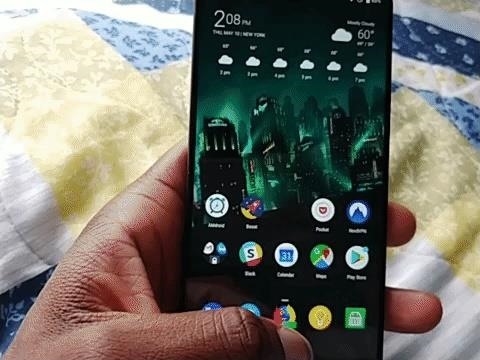
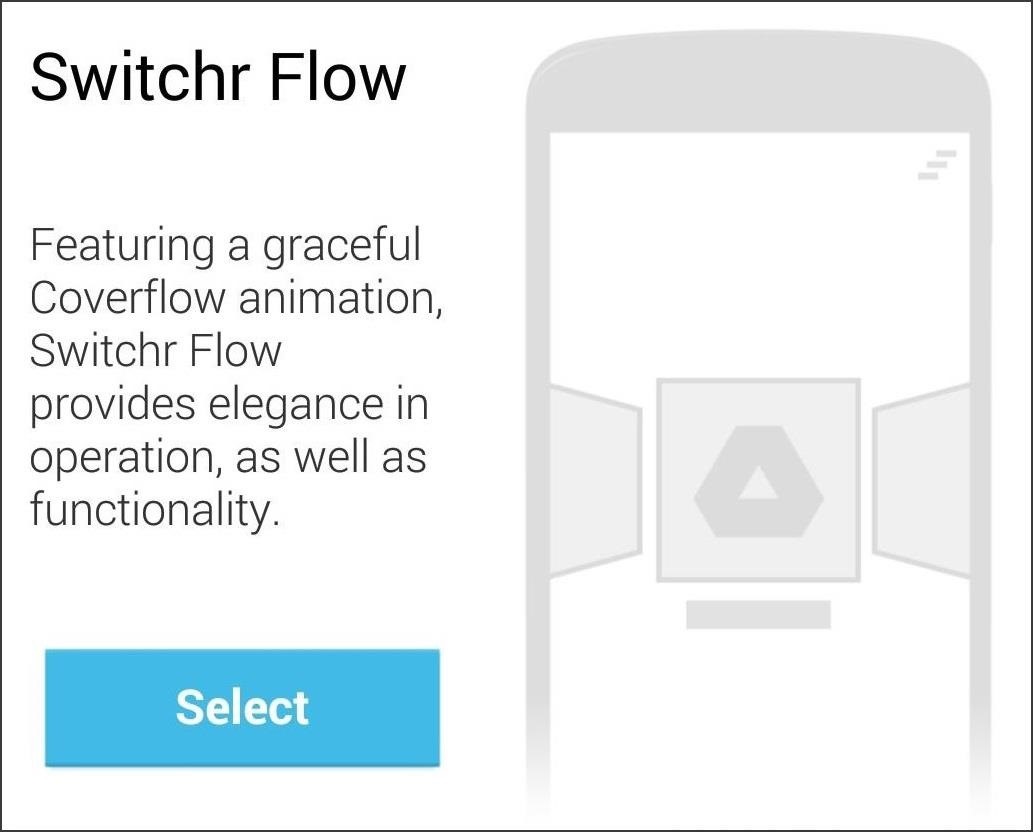
Choosing Your Switchr StyleAfter installing Switchr, you'll be asked to choose between two different styles of multitasking—Switchr Flow or Switchr Slide. Of the two, Switchr Flow (bottom left) is better looking and easier to use. You can access it by swiping in from the top left. In order to access the running apps, hold your finger down and swipe left or right to run through the rolodex.With Switchr Slide (bottom right), you'll also need to swipe into the screen from the top left, but there will be single blocks of an individual app which you can switch by slamming it into the left edge of the screen. Repeat the process to go through all the apps

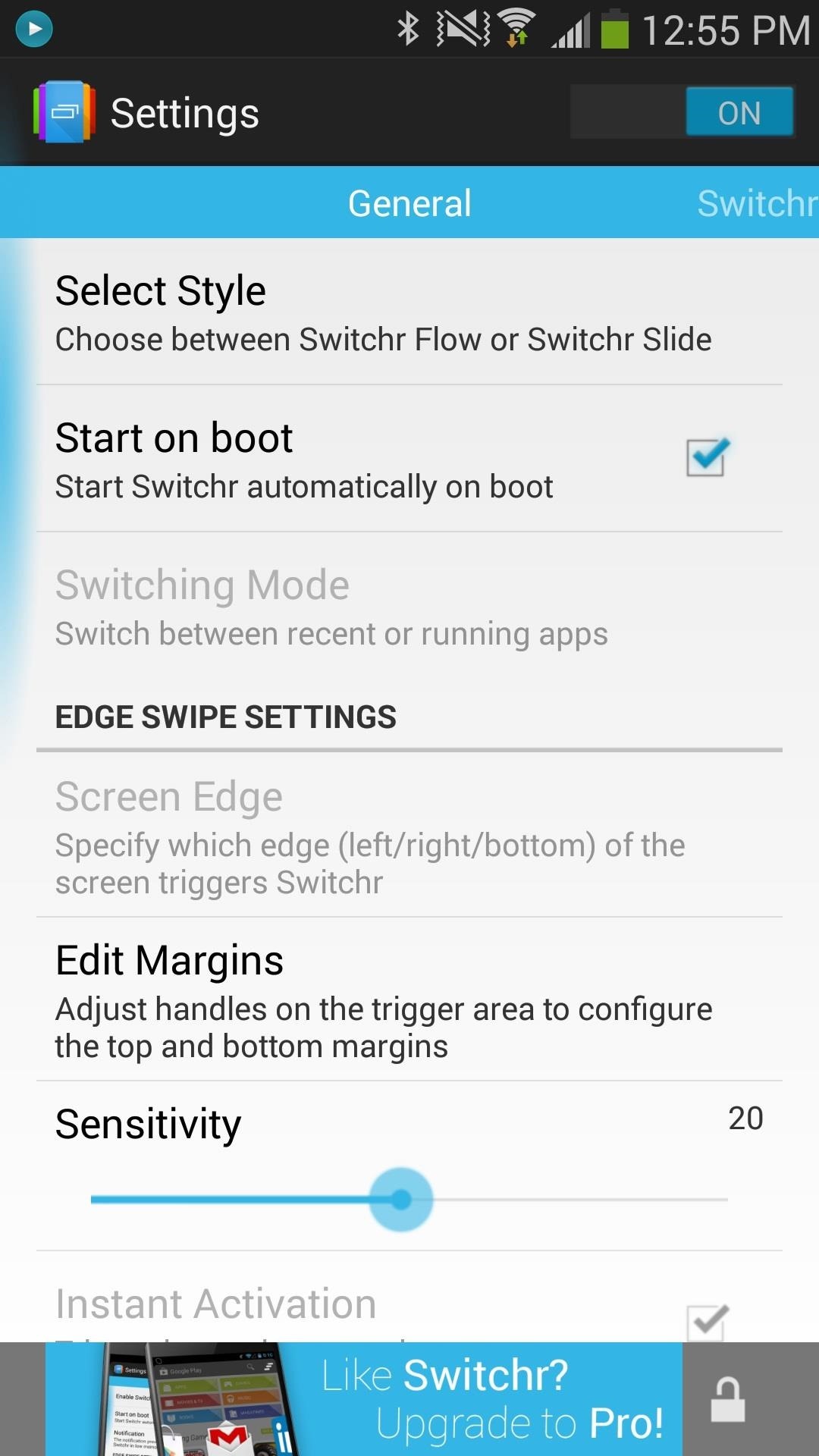
Customizing Your Switchr ExperienceIf you want to customize the app, you'll be limited to a few settings such as changing the style, starting Switchr on boot, editing margins/sensitivity, and whether or not you want the app name to be displayed. In order to unlock the rest of the settings (changing screen edge, enhanced tasking, etc.), you can purchase the pro version (currently $2.99).


While Using the App: This will only allow Uber to access your location when the app is actually open on your screen. However, even with this setting, there are some special circumstances where Uber may still collect your location in the background, but the company claims that you will always receive a notice on the screen in such cases.
Here is How to Stop Uber From Tracking Your Location


Use any of these clients with your torrent files to download content over the BitTorrent network. While these programs are free and legal to use, it doesn't mean the actual content you're downloading via the torrent is legally available in this way.


How To: Enable the Hidden Debug Options for Select Google Apps on Your Nexus 5 News: Christmas Is Coming Early! Android 7.1 Beta Is Hitting Nexus Devices This Month How To: Disable Double-Tap to Wake While Making Calls on Your Nexus 6 How To: Hide Your Nexus 7's Soft Keys to Maximize Usable Screen Space
How to Enable Developer Options on Your Nexus « Nexus 7


Apple's scheduled to show off the first look of iOS 13 at WWDC 2019 on June 3, but what will the new operating system hold for iPhone? Rumors suggest that many features initially planned for iOS 12 will show up in iOS 13, codenamed "Yukon," and dark mode will be the big ticket item this year.
Features We Want in iOS 13 for iPhone (& What's Rumored to


A kernel is essentially the central nervous system of your phone. Whenever anything is done, like turning down your screen brightness or making a call, Android talks to the kernel and then it connects it to the phone's hardware. A custom kernel has been modded with additional features and speed improvements not found on stock versions.


How To: Make Apps Use the Entire Screen on Your Essential Phone — Even the Notch How To: This Is How Android 9.0 Pie Will Handle Notches News: What Every Phone Gained by Adding a Notch News: The Real Reason Android Phones with Notches Have a Chin
What Every Phone Gained by Adding a Notch « Smartphones


Here are step-by-step instructions on how to downgrade your iPhone or iPad from iOS 12 to iOS 11.4. Apple's iOS 12 may be the latest and greatest version of the mobile operating system, but
How to Downgrade iOS 11 to iOS 10.3.3 on iPhone and iPad
osxdaily.com/2017/09/20/downgrade-ios-11-to-ios-10-iphone-ipad/
How to Downgrade iOS 11 to iOS 10.3.3 the Easy Way. Be sure you have recent backups available of your iOS device to avoid potential data loss. An iOS 11 backup is only able to be restored to an iOS 11 device, thus you would need an iOS 10 backup to restore to iOS 10. Failing to have a compatible backup can lead to permanent data loss.
How To Remove iOS 12 and Downgrade to iOS 11 - newsweek.com


Nov 29, 2010 · For reasons inexplicable, a "Today I Learned" thread on Reddit has turned into a treatise on how to make Google Translate beatbox for you, among other things. It must have taken some intense
Turn Google Translate into a Beatbox - GTPlanet


With every cell phone outfitted with a camera, who needs the emergency 7-Eleven point-n-shoot? Well, until it transformed from photographic instrument to weapon. Be careful. Seriously. Consider the how-to lineage. The disposable camera taser hack has inspired derivative mods. Click to play Transform a camera into a taser video (will open in new
How to Hack a camera into a taser - Hacks, Mods & Circuitry


In today's video, we're showing you how to completely reformat your Mac back to factory settings without the need for a recovery disk or drive. Check out the video above to see how!
How to Reformat / Reinstall OS X without Recovery Disk or DVD


The feature pulls in images you've taken at a particular location to give you an overview of your travels. Here's how it works. How to view your location history in Google Maps | Android Central
Yes, Google Maps is tracking you. Here's how to stop it

Hack the News: Build Your Own Media-Altering Newstweek Device


Make specific files available offline. If you have enough storage, some of your most recent files will be automatically saved offline. To manually select files to save offline: Follow the steps above to turn on offline access in Google Drive. Open the Google Docs, Sheets, or Slides home screen. On the file you want to use offline, click More .
3 Ways to Access Google Drive Offline - wikiHow

How To: Multi-Boot Your Nexus 5 to Install & Switch Between Custom ROMs More Easily

How To: Multi-Boot Your Nexus 5 to Install & Switch Between Custom ROMs More Easily
When you enter the softModder realm by rooting your Nexus 5, you open up an exciting world of possibilities and deep customizations for your device. Among other things, it gives you the ability to flash custom ROMs which, individually, act as entirely different operating systems that can vastly alter your user experience.While flashing a ROM is relatively easy, switching back and forth between multiple ROMs can be a pain. Sure, you can always create backups (nandroids) to restore to, but creating those take time.Today, I'm going to show you an easy method that will allow you to load multiple ROMs onto your device and easily boot into different ones at your own leisure. This way you can keep your main ROM while checking out and experimenting with others! Please enable JavaScript to watch this video.
Before continuing, make sure you root your Nexus 5 (it's very easy). You'll also need to have a custom recovery installed.

Step 1: Install MultiROM ManagerMultiROM Manager is the app we're going to be using for this softMod, and it's free on Google Play.

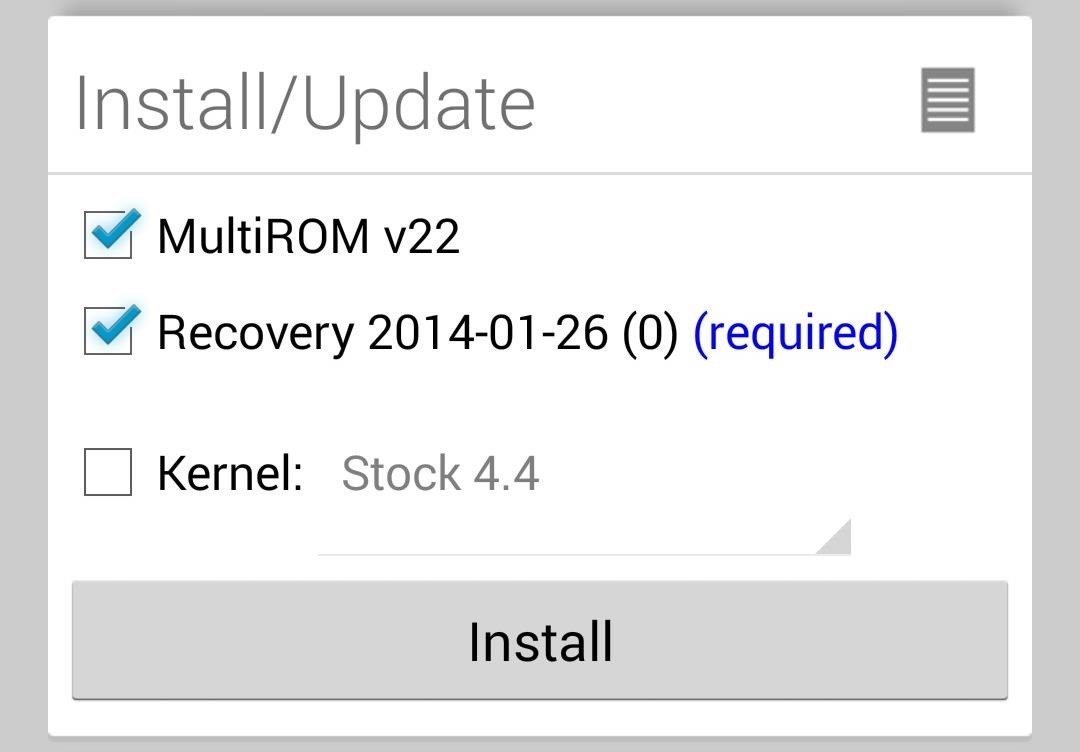
Step 2: Install MultiROM, Recovery, & KernelLaunch the MultiROM Manager and check all three boxes under the Install /Update card—MultiROM v22, Recovery 2014-01-26 (0), and Kernel. Now hit the Install button and your system will install each package and reboot. Your device will now boot into MultiROM. If you do nothing, your Nexus will automatically reboot within a few seconds. If you tap the screen, you can select a ROM to boot, but for now you won't have any because we haven't downloaded any yet.

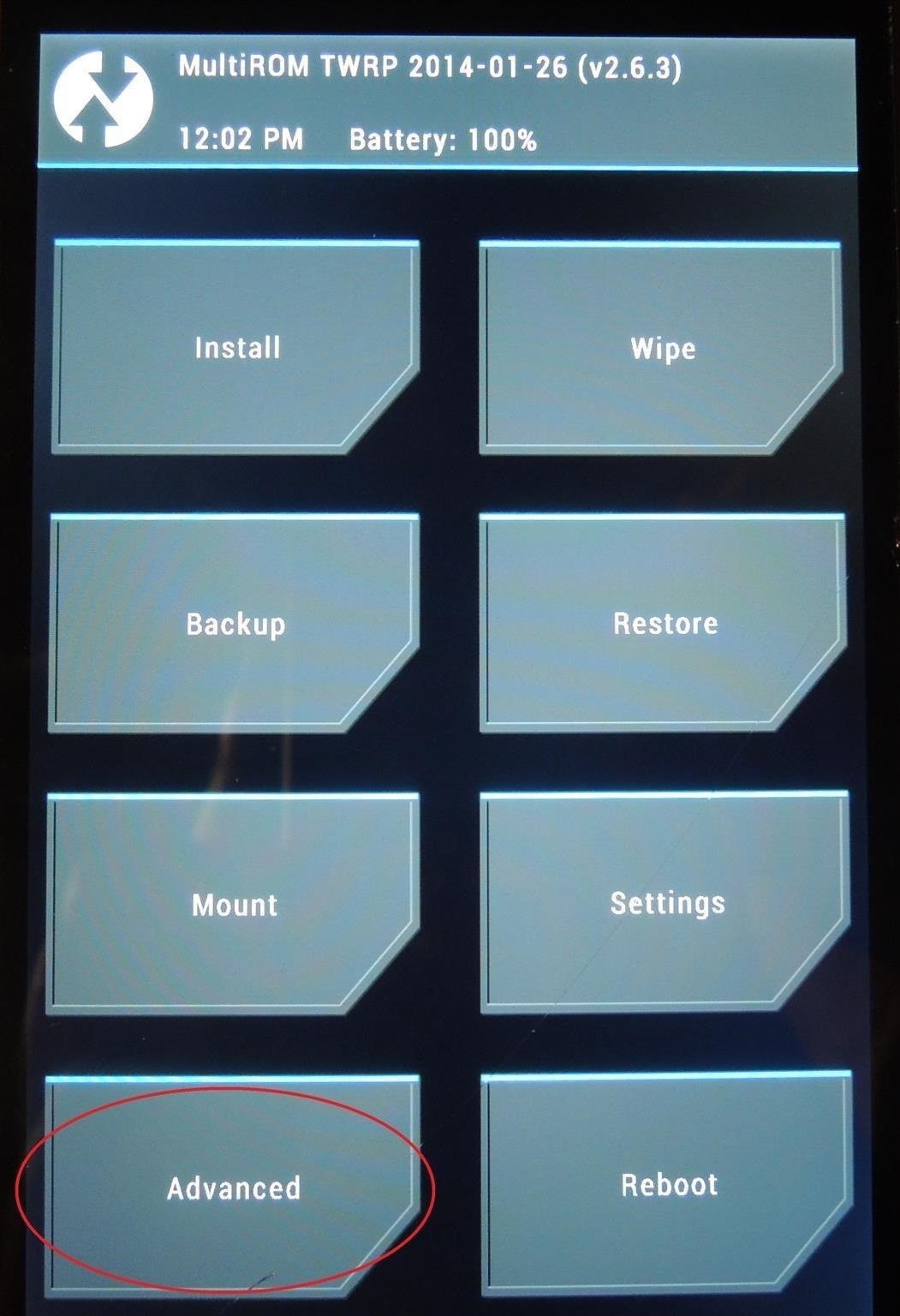
Step 3: Add ROMs to MultiROMAt this point, any ROM you download to your phone's internal storage can be added to MultiROM and switched to when you initially turn on your device.For example, I used GooManager, a great tool to find and download ROMs, to get AOKP as a .zip file to my phone's internal storage. For more info on using GooManager and the AOKP ROM, check out my previous guide on installing custom ROMs.With some ROMs on your Nexus, just reboot into recovery mode by turning off the device, holding the Volume down and Power buttons at the same time, then selecting "recovery" with the Volume keys and making the selection with the Power button.Once in recovery, tap Advanced, then MultiROM, then Add ROM. In the next menu, select Android for ROM, unless you're using Ubuntu (you would know if you were). Then select Don't share to keep ROMs separate from one another, enabling you to switch back and forth between them. Now just hit Next and tap ZIP file. Image via wonderhowto.com Assuming you used the GooManager method, you'll find the ROM under the goomanager folder. Select the ROM, in this example AOKP, then swipe the arrow to install and tap Reboot to finish the process.

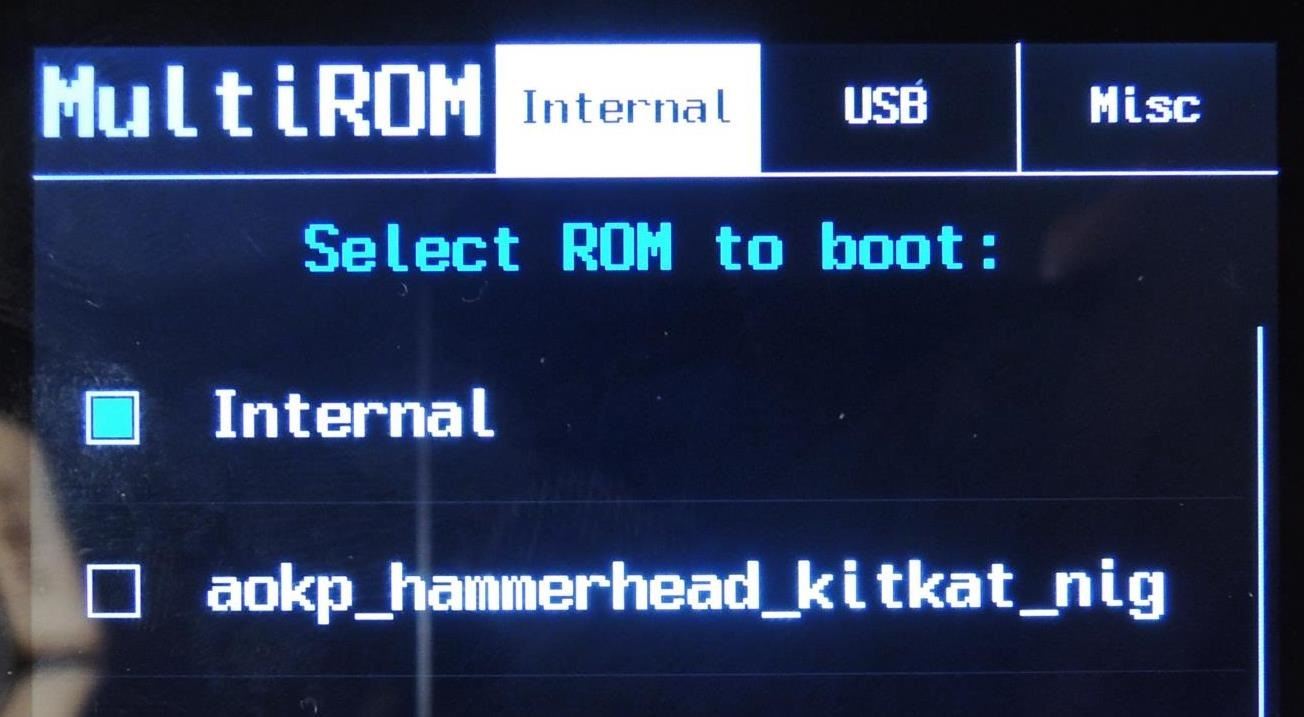
Step 4: Switch Between Your ROMsWhen your device boots, you'll now see your newly installed ROM as an option to boot in to. Simply tap the screen, select the ROM, then Boot. If you don't like the ROM or are having issues, no problem—just reboot your phone, then select Internal to go back to your stock setup or original ROM. With MultiROM, you're only limited by how many ROMs you can fit on your phone's internal storage, so don't be afraid to experiment! Add different ROMs to MultiROM with the confidence that you can always boot back into your main daily-driver ROM with no issues.This method gives you the freedom to explore what Android can do for you, hassle free.


Click Order Status > Check Order Status. Follow the on-screen instructions to check order status or track shipping. Check your order from the T-Mobile App Open the app. If you don't have it, download it now. Scroll to and tap Track shipment to get the latest update on the location of the package.
iPhone X Now Shipping - Here's How To Get Tracking Info Early


Netflix, Hulu Plus, and Amazon Prime all advertise a huge selection of streaming movies and shows - but which gives you the best bang for your buck? Comparing On-Demand Streaming Media Providers On-demand streaming media equals convenience and affordable entertainment.
Netflix, Amazon, Hulu: What streaming services should you


Starting today, you'll have the option to save your live video to your phone at the end of a broadcast. While live videos will continue to disappear from the app when you're done, this update gives you the flexibility to hold onto your video and re-watch it later, especially if something exciting happens during your…
Instagram Live Replays: What Marketers Need to Know


Apple today seeded the fifth beta of an upcoming iOS 12.2 update to developers for testing purposes, one week after seeding the fourth beta of iOS 12.2 and more than a month after the release of
iOS 13: Every new feature iPhone you need to know about now


The latest generation of iPhone is coming soon to an Apple Store near you. And yes, I really want it. I mean yes, I NEED it. So what to do with that soon to be OLD iPhone? You could sell it, or better yet, you could repurpose it and turn your iPhone into iPod Touch for the whole family to use! Can


In this video I'm going to show you how to use your android mobile as a mic for your pc or laptop. for more details visit my website

Step 2: Set Languages on a Per-App Basis. When you get back up, go ahead and open App Locale. From here, you'll see a list of all your installed apps—simply select one to change the language it uses. Once you've chosen a new locale for any app, you'll have to clear the app from your recent apps menu, then relaunch it to see the changes.
How To Set Language On A Per-App Basis In Windows 10


FREE SHEET MUSIC FOR JUNE 3, 2019 Every two weeks, Virtual Sheet Music offers a new item for free download from its high quality, pure digital sheet music catalog. Come back on this page regularly to download the latest free titles, because after one month, each title returns to our "for purchase" only catalog (is no longer free) and a new free
SCORECLOUD | Free Music Notation Software - Music Composition


Whew! That's a lot of super cool, highly useful RV apps. Now, I want to hear from you. What are your favorite apps for RV travel? Leave your choices in the comment box below. Like this article? Share it with your friends. Post it, tweet it, pin it, or like it. Take a moment and share this article. Thanks!
18 Must-Have Travel Apps For Traveling Abroad - Lifehack


How to use Apple Pay on the Apple Watch procedure to verify your cards. My Bank of America debit card let me log into my account via their iPhone app, but my Capital One credit card required

How to capture, edit, and share videos using Adobe Premiere


1. Launch an app containing your document. The iPhone's cut and paste option is available only on apps that can edit documents, such as Pages, Google Drive, Office Mobile for Office or Microsoft
How To Use Cut, Copy And Paste Feature On Apple iPhone 8 And

How To: Activate MMS text messaging on the iPhone for T-Mobile

How To: Activate MMS text messaging on the iPhone for T-Mobile
If you have T-Mobile and haven't quite figured out how to get MMS working with it on the iPhone, check out this video. This tutorial will cover activating the iPhones original MMS feature to work with t-mobile. This feature also allows you to share your iphones internet connection with other computers. Please enable JavaScript to watch this video.


Have one of the jackass guys think the skit is to go tandem skydiving with a funny costume on but the real prank is right as the jackass guy and the skydiving instructor jump out of the airplane the skydiving instructor says, "oh shit" and pretends their was a malfunction with the parachute that they're not deploying and then when they get close enough that they need to deploy it he deploys it
Gadget Hacks News — Page 52 of 55 « Gadget Hacks


Turn off "Power Saving Mode" on your Android device. Power Saving Mode can limit the processing power of your device which might affect the performance of the Cast Screen feature. Important: The "Microphone" permission in the Google Play Services app needs to be turned on to successfully use the 'Cast Screen/Audio' feature with Chromecast.
How to Mirror Your Nexus 5's Display on Your TV Using


Top 10 Best Text Message Readers for Android/iPhone - Listen & Reply My Text Messages Hands-Free. It is a common sense to people that reading text messages or texting back while driving is very dangerous, yet still a lot of people are getting accidents on account of this.
Text by Voice for Android Reads Incoming SMS Messages Aloud


The UCSC Genome Browser is a public, freely available, open source web-based graphical viewer for the display of genome sequences and their annotations. See
Mouse strain assembly hub - May 3, 2017 - UCSC Genome Browser
hgdownload.soe.ucsc.edu/hubs/mouseStrains/hubIndex.html
Mouse strain assembly hub - May 3, 2017. This assembly hub contains 16 different strains of mice as the primary sequence, along with strain-specific gene annotations. Viewing this assembly hub on mm10, there will be a multiple alignment between the reference and 16 different strains of mice plus rat.
UCSC Genome Browser Store


When you buy your iPhone, iPad, or iPod touch, it comes with a set storage capacity ranging from 16 to 256GB for iPhone, 16 to 512GB for iPad, and 8 to 128GB for iPod touch. The music you buy, the apps you download, the photos you take, and all of the other content that you enjoy on your device uses its storage.
How to back up your iPhone, iPad, and iPod touch - Apple Support


This video will show you how to solder a circuit board the best way pleas comment on this video that shows you how to solder a circuit board soldering a circuit board is harder then soldering wire
How to Prototype Without Using Printed Circuit Boards: 8 Steps


You no longer need two fingers to take screenshots on Android. As long as you have Android 6.0 or higher on your phone or tablet, you can use Now on Tap to take screenshots for you without pressing any hardware buttons. Now on Tap already essentially takes a screenshot of your display to analyze the
How to take screenshots on Android - Android Authority


You actually need to delete different sets of cache files as Windows 8 has 2 computing environments running at the same time i.e, regular desktop and the new metro UI. Let us help you to free up disk space and clear all caches in your Windows 8 PC. Free Up Disk Space and clear All Caches in Windows 8 Delete your Temp files
How to Clear All Caches and Free Up Disk Space in - YouTube


Hack Like a Pro: Python Scripting for the Aspiring Hacker, Part 1 How to Train Your Python: Part 15, Script Structure and Execution How to Train Your Python: Part 1, Introduction How To: How One Man's Python Script Got Him Over 20,000 Karma on Reddit—Without Cheating
How to Kill Processes in Windows (Using Python - WonderHowTo


Samsung included an "SOS" feature for its phones since the Galaxy S6 that could literally be a lifesaver should you ever find yourself in an emergency situation. It's one of those things that we hope to never have to use but will be very thankful for if a need ever arises.
How Star Wars: Galaxy's Edge Really Makes You Feel Like You


Are you marketing on Facebook? Do you want better reach for your Facebook posts? Using the right posting tactics will give you better results from your Facebook marketing. In this article you'll discover six tips for more effective Facebook posts. Discover six tips to improve Facebook posts. Listen to this article:
The 5 Things You Should Never Post on Facebook - Lifewire

How to Customize The "Slide to Unlock" Text on Your iPhone's